DSPy’s RLM implements recursive language models, a system where an LLM writes Python code through which it can pass parts of its context to LLM calls, leading to significantly enhanced long-context reasoning.
The generated code runs in a REPL, and in this guide we use and present DaytonaInterpreter, which plugs into DSPy as the code-execution backend so that all generated code runs inside an isolated Daytona cloud sandbox rather than on your machine.
1. Setup
Clone the Repository
Clone the Daytona repository and navigate to the example directory:
git clone https://github.com/daytonaio/daytona.gitcd daytona/guides/python/dspy-rlmsCreate Virtual Environment
python3.10 -m venv venvsource venv/bin/activate # On Windows: venv\Scripts\activateInstall Dependencies
pip install -e .This installs the DSPy framework and the Daytona SDK. To also run the included demo (which plots results with matplotlib), use
pip install -e ".[demo]"Configure Environment
Create a .env file with your API keys:
cp .env.example .env# Edit .env with your keysThe file needs two variables:
DAYTONA_API_KEY=your_daytona_api_keyOPENROUTER_API_KEY=your_openrouter_api_key # or OPENAI_API_KEY / ANTHROPIC_API_KEY2. Basic Usage
The following example shows the basic setup — configure a model, create a DaytonaInterpreter, and pass it to an RLM. The generated code can call llm_query() to delegate semantic work back to the LLM:
import dspyfrom dotenv import load_dotenvfrom daytona_interpreter import DaytonaInterpreter
load_dotenv()
lm = dspy.LM("openrouter/google/gemini-3-flash-preview")dspy.configure(lm=lm)
interpreter = DaytonaInterpreter()
rlm = dspy.RLM(    signature="documents: list[str], question: str -> answer: str",    interpreter=interpreter,    verbose=True,)
documents = [...]  # your documentsresult = rlm(documents=documents, question="Summarize the key findings across these documents.")print(result.answer)
interpreter.shutdown()
Inside the sandbox, the RLM might loop over the documents, call llm_query() to summarize each one, then aggregate the results with Python before calling SUBMIT(answer=...).
3. Workflow Overview
Each RLM call runs an iterative REPL loop. The LLM writes Python code, the code executes in a Daytona sandbox, and the output is fed back to the LLM for the next iteration. Crucially, the generated code can call llm_query() to invoke a sub-LLM call — this is how the LLM delegates semantic work (understanding, extraction, classification) to itself while keeping the orchestration logic in Python.
- Prompt — RLM sends the task inputs and previous turns to the LLM
- Code — The LLM responds with reasoning and a Python code snippet
- Execute — The code runs inside a Daytona sandbox; any
llm_query()calls are bridged back to the host LLM - Repeat — Steps 1–3 repeat until the code calls
SUBMIT()or the iteration limit is reached
How Bridging Works
Step 3 above mentions that llm_query() calls are “bridged back to the host.” Here’s a diagram and an explanation of that process:
Host Process Daytona Sandbox┌──────────────────────────────┐ ┌──────────────────────────────┐│ DaytonaInterpreter │ │ Broker Server (Flask) ││ │ │ ││ • polls the broker for │ tool call, │ • accepts requests from ││ pending requests │ e.g. llm_query │ the wrapper functions ││ │◄───────────────│ ││ • calls the LLM API │ │ • queues them for the host ││ or runs tool functions │ result │ • returns results once the ││ • posts results back │───────────────►│ host replies ││ │ │ │└──────────────────────────────┘ │ Generated Code │ │ │ • llm_query() │ ▼ │ • llm_query_batched() │ LLM API │ • custom tool wrappers │ └──────────────────────────────┘When DaytonaInterpreter starts, it launches a small Flask broker server inside the sandbox and injects wrapper functions (llm_query, llm_query_batched, and any custom tools you provide). These wrappers POST requests to the broker and block until a result arrives. On the host side, a polling loop picks up pending requests, executes them (e.g. calls the LLM API or runs your tool function), and posts the results back to the broker. From the generated code’s perspective, the wrappers look and behave like ordinary Python functions.
Custom tools passed via the tools dict use the same mechanism, so that the host generates a matching wrapper inside the sandbox and bridges calls identically.
State persists across iterations: variables, imports, and function definitions all carry over.
Sub-LLM Calls
Two built-in functions are available inside the sandbox:
llm_query(prompt)— send a single natural-language prompt to the LLM, get a string backllm_query_batched(prompts)— send multiple prompts concurrently, get a list of strings back
These execute on the host (they need LLM API access) and are bridged into the sandbox. From the generated code’s perspective they are ordinary Python functions that take strings and return strings. This is what makes the pattern powerful: the LLM can write a for loop over 100 chapters, call llm_query_batched() to extract structured data from each one in parallel, then aggregate and use the results with additional Python code.
4. Example Walkthrough
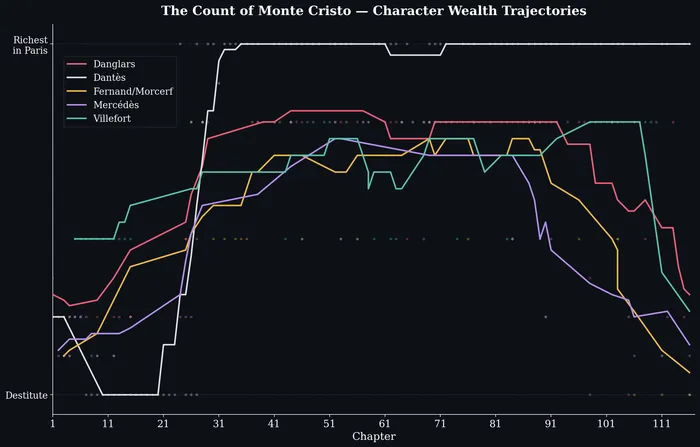
The included demo.py shows a realistic use of sub-LLM calls: literary analysis of The Count of Monte Cristo — a ~1,300-page novel with 117 chapters — tracking the wealth trajectory of five major characters. The RLM uses llm_query_batched() to process chapters in parallel batches, then aggregates the results with Python.
How the Demo Works
The script fetches the full novel text from Project Gutenberg, splits it into chapters, and passes them to an RLM configured with a typed signature:
interpreter = DaytonaInterpreter()
rlm = dspy.RLM(    signature="chapters: list[str], task: str -> wealth_data: list[dict]",    interpreter=interpreter,    max_iterations=40,    max_llm_calls=500,    verbose=True,)
chapters = fetch_chapters()print(f"Fetched {len(chapters)} chapters")
TASK = (    "Analyze the economic trajectory of each major character across the novel. "    "For each chapter where a character's wealth status is mentioned or implied, "    "produce a dict with keys: chapter (int), character (str), wealth (int 1-10 "    "where 1=destitute and 10=richest in Paris), and event (str, brief description "    "of what changed). Track the following characters: Dantès, Danglars, Fernand/"    "Morcerf, Villefort, and Mercédès. You need to cover each chapter in the book.")
result = rlm(chapters=chapters, task=TASK)wealth_data = result.wealth_data
What the RLM Does
The RLM’s generated code follows a pattern typical of sub-LLM workloads:
- Batch the input — Split the 117 chapters into manageable groups
- Fan out with
llm_query_batched()— For each batch, send a prompt like “Extract wealth events from these chapters as JSON” — the sub-LLM calls run concurrently on the host - Parse and accumulate — Each sub-call returns a string; the code parses the JSON and appends to a running list
- Iterate — Repeat for the next batch; state (the accumulated list) persists across REPL iterations
- Submit — Once all chapters are processed, call
SUBMIT(wealth_data=accumulated_results)
This is the core RLM pattern: Python handles the data plumbing (batching, parsing, aggregating) while llm_query_batched() handles the parts that need language understanding (reading prose, identifying wealth events, rating severity).
Running the Demo
python demo.pyThe script plots the results with matplotlib after the RLM finishes.
Results
The output is a list of {chapter, character, wealth, event} dictionaries that the script plots as smoothed time series:
5. Conclusion
RLMs combine the LLM’s language understanding with Python’s ability to loop, branch, and aggregate — the generated code calls the LLM whenever it needs semantic reasoning and handles everything else with ordinary computation. DaytonaInterpreter makes this safe to run by executing all generated code in an isolated Daytona cloud sandbox:
- Sub-LLM recursion —
llm_query()andllm_query_batched()are bridged from the sandbox to the host, letting generated code invoke the LLM for semantic tasks like extraction, classification, and summarisation - Isolation — All generated code runs in a Daytona cloud sandbox, not on your machine
- Persistent state — Variables, imports, and definitions survive across REPL iterations, so the LLM can accumulate results across batches