Claude Managed Agents – Anthropic's harness for long-running, asynchronous Claude agents – can now run inside your own Daytona sandboxes.
Coding agents like Claude Code are built around live interaction: you sit at the terminal, instruct, watch the agent work. Claude Managed Agents leans the other way. It's built for tasks that run long enough that a human doesn't need to watch continuously, though you can still send mid-session messages or gate sensitive actions behind approval when you want to. The agent loop runs as long as the task takes, through builds, reviews, possibly hours of idle waiting.
What stays on each side
In this integration, the agent loop, prompt caching, compaction, and tool dispatch run on Anthropic's side. Daytona is where the agent's filesystem and shell tools execute.
MCP servers and web tools are also dispatched by Anthropic server-side, with MCP credentials held in Anthropic-managed vaults.
Architecture
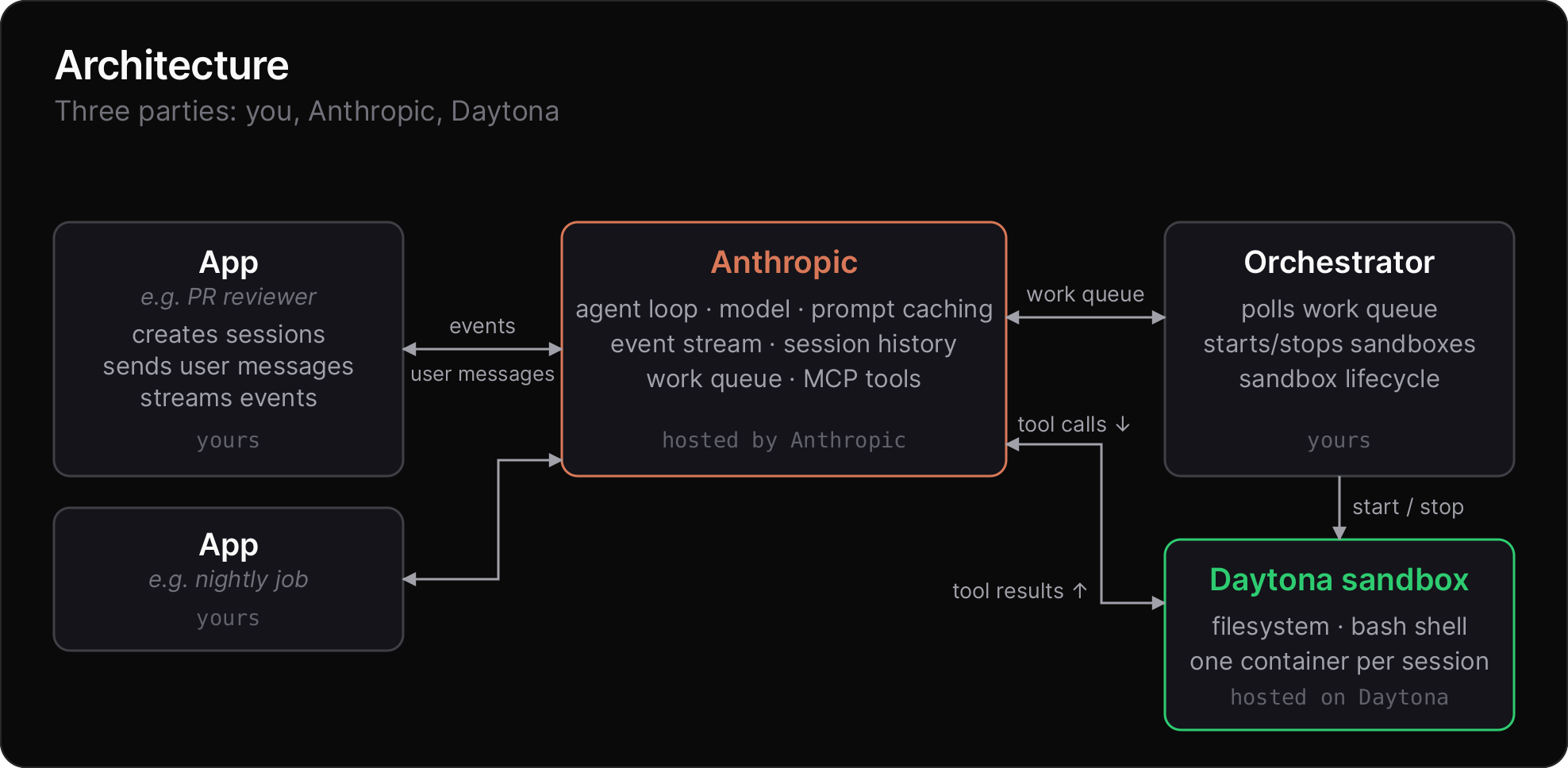
On your side, you run one orchestrator and any number of session-driving applications. The orchestrator polls Anthropic's work queue, starts and stops Daytona sandboxes for each session, and launches the agent's tool runner inside each one. The apps create sessions, send user messages, and stream events back to your users.
Apps and orchestrator do not communicate directly. Anthropic sits between them, routing work to the orchestrator and events to the apps.
Sandbox per session
Each Claude agent gets its own sandbox which can then be stopped while the agent waits on input, preserving the full filesystem state. This lets you scale up the number of long-running agents, as you're not paying compute costs while the agent is waiting on input.
With VM-backed sandboxes, pausing preserves the full memory state too. You can also fork a sandbox to clone its state at a chosen point, useful if you want to build more advanced session workflows. Forks can themselves be forked, branching out into a tree.
Bring your own dependencies
Bake whatever your agent needs into a snapshot: your language toolchain, system packages, in-house CLIs. Every new session boots from your image.
For per-session setup, prepare a sandbox before the session starts: clone a repo, load a dataset, drop in short-lived credentials, mount a volume or bucket, then hand it off.
This means that each session can start with its own data already in place, on its own volume, with its own credentials, ready before the agent runs its first tool call.
Get started
Read the Claude Managed Agents on Daytona guide and the Claude Managed Agents documentation to get started.