

An agent working in a Daytona sandbox sooner or later needs a browser: to check the app it just built, read a page, or sign in somewhere. It can run that browser inside the sandbox, next to its code, or connect to one that runs outside. Both work on Daytona. Which one fits depends on where the browser is going and what it has to carry with it.
A browser inside the Daytona sandbox
Daytona makes this the easy default. The default image ships Chromium, which Playwright drives with no extra install, and computer use starts a full desktop with VNC for agents that work through a screen. The browser sits next to the code, so it reaches localhost directly and needs no network setup at all.
That is the simplest setup for testing an app the agent built, on pages with no bot protection, with no logins to keep after the sandbox is gone. The one thing to plan for is memory, because the browser shares it with everything else in the sandbox, and the pages decide how much it needs.
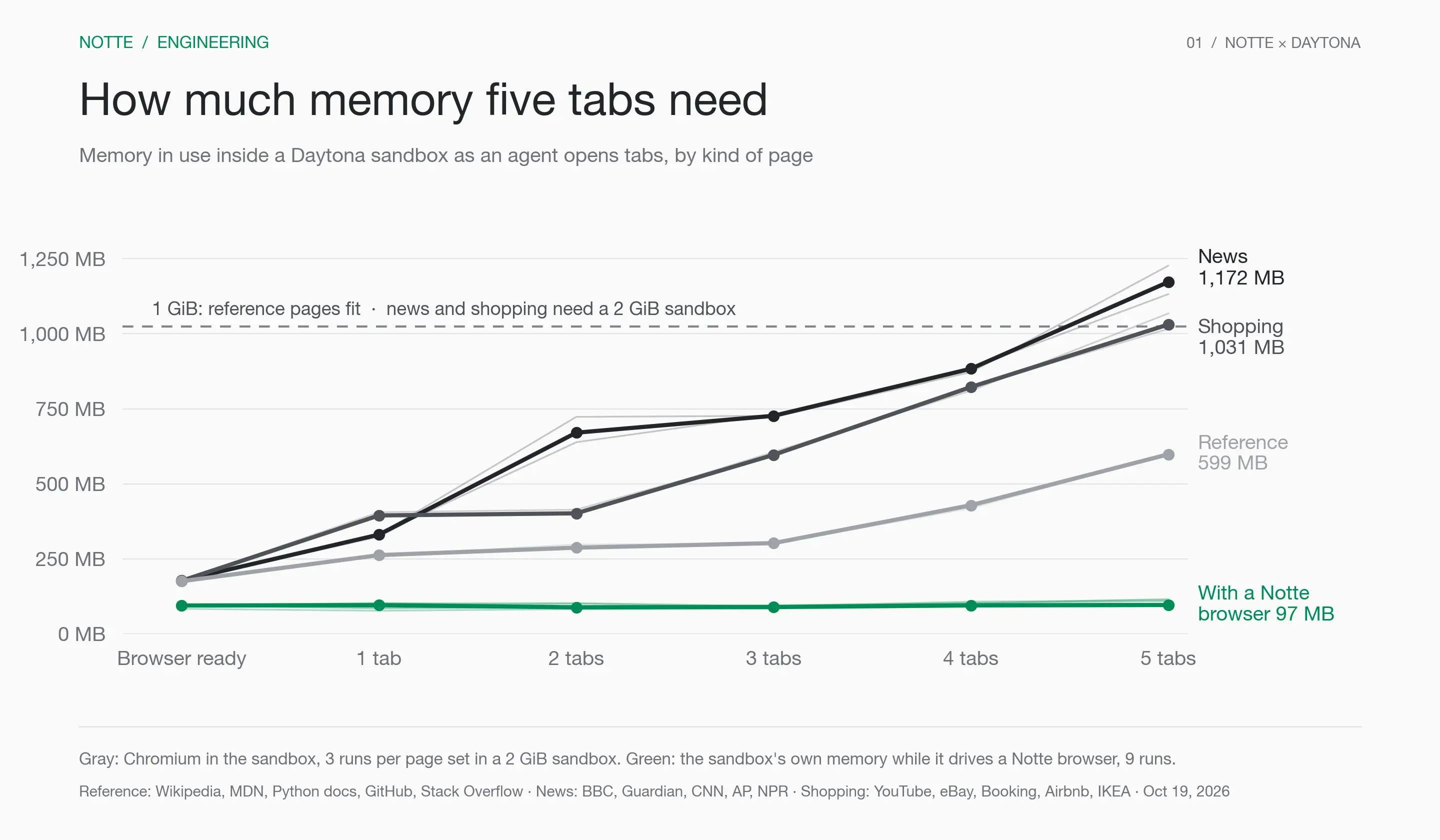
Gray: Chromium in the sandbox, per kind of page. Green: the sandbox's own memory while it drives a Notte browser. File cache and shared memory are excluded but also count toward the limit.
Five reference pages such as Wikipedia and MDN needed about 600 MB and fit a default 1 GiB sandbox in every run. Five news or shopping pages needed 1,030 to 1,170 MB, so give the sandbox 2 GiB for those. Daytona can also grow a running sandbox once resizing is enabled for your organization.
A Notte browser outside the sandbox
Sites you do not control check who is visiting, often challenge traffic from hosting providers, and expect you to stay signed in. That takes more than a stock browser:
Bot detection. Notte sessions use a consistent, recent desktop Chrome fingerprint, with timezone and locale matched to the exit IP.
Network and captchas. Sessions can route through residential proxies and solve captchas such as reCAPTCHA v2, hCaptcha and Cloudflare Turnstile.
Logins. A Notte profile keeps cookies and storage, so a session from a fresh sandbox starts signed in.
Memory. Each session has its own. In our runs, a sandbox driving a Notte browser stayed between 85 and 115 MB whatever the pages.
Debugging. Every session has a live viewer and a replay, so you can see what the agent saw.
The agent still drives it from the sandbox, with the Notte CLI or with Playwright over CDP. The sandbox needs outbound access to the Notte API for that.
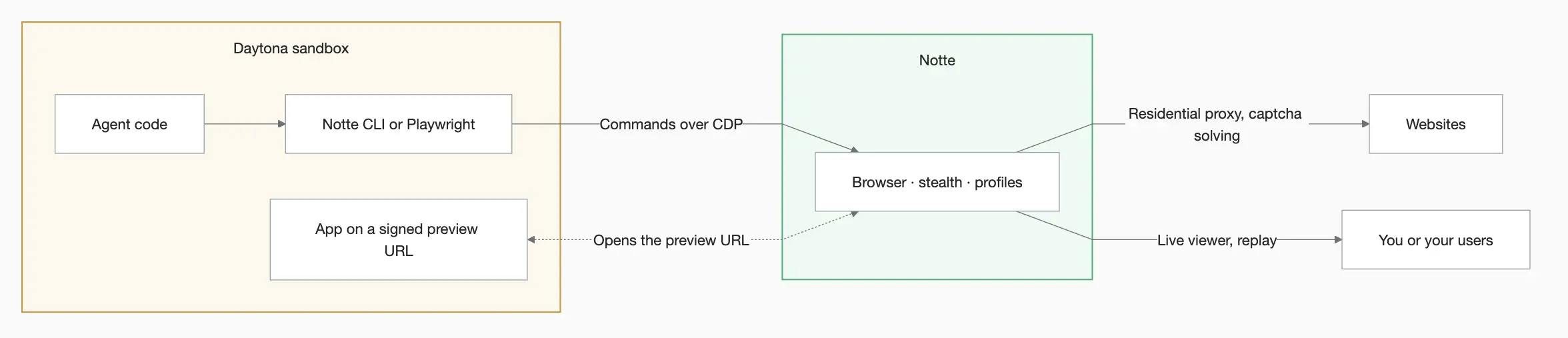
The sandbox keeps the agent's code, a small driver and any app it serves. The browser runs on Notte, reaches that app and the open web, and can be watched from outside.
Side by side:
| What you need | Chromium in the sandbox | Notte browser |
|---|---|---|
| Reaching the agent's app | localhost, directly | Through a signed preview URL |
| Outbound network | None needed | Access to the Notte API |
| Memory | Shared with the sandbox | Its own, per session |
| Bot protection and captchas | Stock Chromium | Fingerprint, residential proxies, captcha solving |
| Logins after the sandbox is deleted | Deleted with it | Kept in a profile |
| Watching the agent | VNC desktop with computer use | Live viewer and replay |
| Cost | Nothing beyond the sandbox | Billed while a session is open |
Where we use both
This split is how our own product works. Anything API turns a description of a web task into an API you can call: ask it for the top posts on Hacker News and it builds a function that fetches them, rather than answering with the posts.
Each conversation has its own Daytona sandbox with Python, the Notte CLI and SDK, rg and jq. Files survive between turns. When a conversation goes quiet the sandbox stops, and it starts again when the user comes back. That restart is why we moved Anything API to Daytona in September: in our tests, Daytona brought a stopped workspace back with its files verified in a median of 1.27 seconds.
The agent works on other people's sites, so it opens Notte browsers from the sandbox with CLI commands. Over 30 days to October 19, about a quarter of conversations opened one. The command that matters most is notte sessions network, which downloads the XHR and fetch traffic a page made. That is how the agent finds the API behind a site.
Here is that step on the YC company directory, run by hand:
1notte sessions start -o json2notte page goto "https://www.ycombinator.com/companies?batch=Spring%202025" -o json3notte sessions stop -o json4notte sessions network --session-id <id> -o json
The log held nine requests. Two went to Algolia, the search service behind the page, and the larger one returned all 144 companies in the batch. A ten-line Python client that sent the same request returned the same 144 companies, with no browser. In Anything API, this is the part the sandbox does: the agent writes the client, runs it with python3, fixes what broke, and deploys it as a Notte Function.
Testing a sandbox app with a Notte browser
The Notte guide in Daytona's guides repository shows the split on a small scale. One script, browser_test.py, runs the whole test:
It creates a sandbox from the
daytona-smallsnapshot, uploads a small to-do app and serves it on port 3000 withpython3 -m http.server.It asks Daytona for a signed preview URL for that port.
A Notte browser opens the URL with Playwright over CDP, reads the to-do list and saves a screenshot.
A second Notte session runs the commands a coding agent would type:
notte page goto,fill,clickandscrape. It adds a to-do and checks that the page shows it.Both sessions stop and the sandbox is deleted.
The Playwright pass is a few lines:
1url = sandbox.create_signed_preview_url(3000, expires_in_seconds=3600).url23with notte.Session(extra_http_headers={"X-Daytona-Skip-Preview-Warning": "true"}) as session:4 page = session.page # a Playwright page connected to the Notte browser5 page.goto(url)6 print(page.locator("#todos li").all_inner_texts())
A signed preview URL carries its token, so the remote browser needs no auth header, and the extra header skips the warning page Daytona shows browsers on first load.
Chromium in the sandbox could test this app too. The guide uses a Notte browser for three reasons. The sandbox never runs a browser, so its memory goes to the app, and it makes no outbound calls, so the guide works on Daytona's default network policy. The script prints a live viewer link, so you can watch the test as it runs. And the same browser code keeps working when the agent moves on to sites it does not control.
To run it, set DAYTONA_API_KEY and NOTTE_API_KEY, install the Notte CLI, then run python browser_test.py. Swap the to-do app for whatever your agent builds. Any server listening on a sandbox port gets a preview URL, so the browser code stays the same.
What each side brings
Daytona gives the agent a computer that keeps its files between turns, comes back in about a second, and can run a browser right next to the code. Notte gives it a browser for sites that push back, with logins it keeps and traffic it can read. In Anything API, the sandbox writes and tests the code, and the Notte browser finds what that code should call.
