


TL;DR
RL environments will move beyond Linux. Real enterprise workflows span Windows, macOS, and Linux, creating opportunities for more realistic and challenging agent training environments.
Daytona unlocks cross-OS RL environments. With Linux, macOS, and Windows sandboxes available through a single API, researchers can build tasks spanning real operating systems without managing separate infrastructure for each.
Our collaboration with OpenEnv makes these environments easier to scale. OpenEnv provides a standardized interface for agent training and evaluation, while Daytona handles sandbox provisioning and execution, creating a foundation for reproducible environments that are grindable at scale.
We built Fleet Migration to demonstrate what's possible. An agent must repair a three-machine fleet after a breaking API change, with a single reward evaluating whether the entire fleet works.
Even this relatively simple task exposed meaningful gaps. DeepSeek Pro succeeded in 77% of runs versus 42% for DeepSeek Flash. Failures centered on Windows, highlighting challenges that Linux-only environments would miss.
Most coding-agent benchmarks run in Linux containers. That makes sense: they're inexpensive, reproducible, and easy to evaluate. But real enterprise workflows rarely stay within a single operating system.
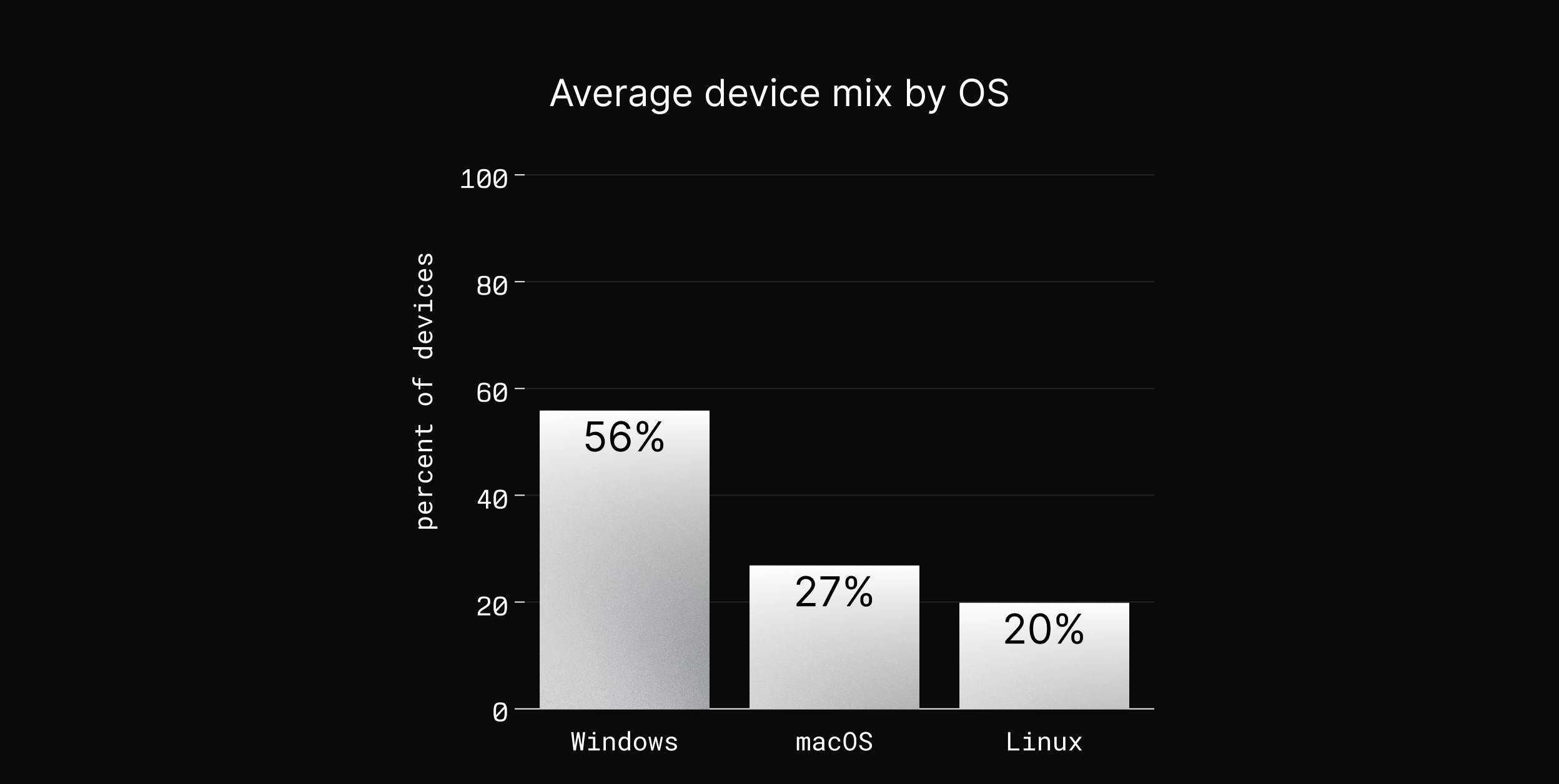
A recent survey found that organizations reported an average device mix of 56% Windows, 27% macOS, and 20% Linux. For IT and platform teams, that means working across different shells, schedulers, and execution environments, often within the same workflow.
"The execution layer will be larger than inference. Agents will run everywhere, on every kind of computer, so we run them on Linux, macOS and Windows."
— Ivan Burazin, CEO of Daytona
What happens when an agent has to solve one problem across all three?
We built Fleet Migration, a reinforcement learning environment that tests exactly that. An agent must repair a breaking API change across three machines: a Linux server, a macOS laptop, and a Windows laptop. The task has a single reward evaluating whether the fleet is restored without losing production data.
Using Daytona, each episode provisions three real operating-system sandboxes through one API. We integrated the environment with OpenEnv to provide a standardized interface for agent training and evaluation.
Across 25 runs, DeepSeek Pro succeeded in 77% of its attempts, compared to 42% for DeepSeek Flash. Every observed failure involved Windows, exposing challenges that conventional Linux-only environments would miss.
The Fleet
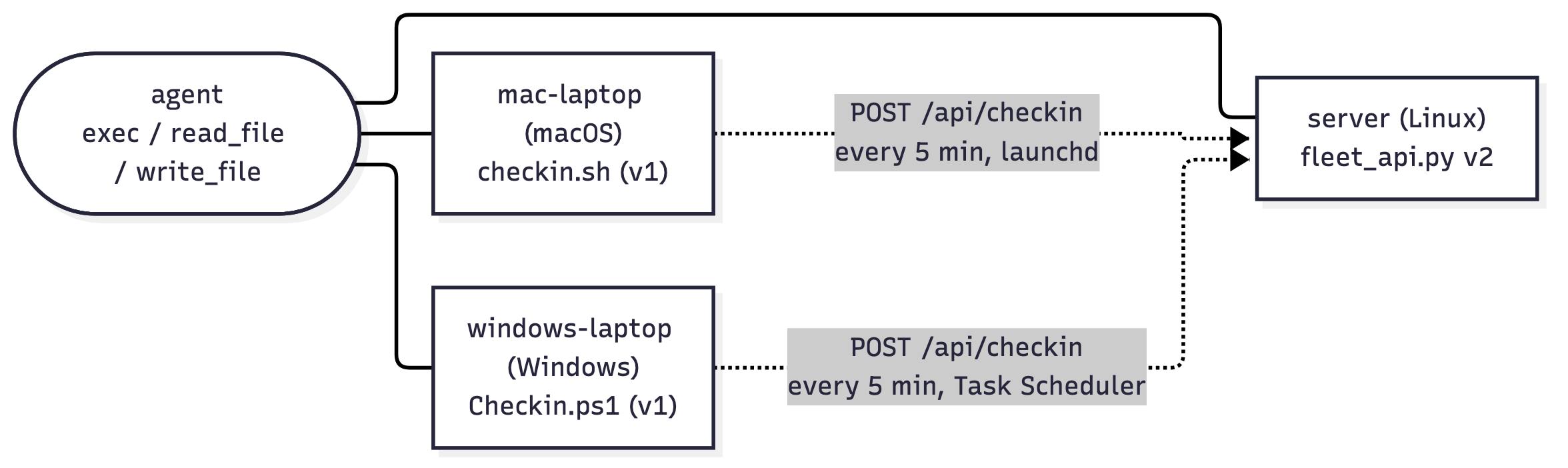
Each episode provisions three independent Daytona sandboxes: one server and two laptops, each running a different operating system.
server (Linux · Bash): Runs
fleet_api.py, the check-in API, which has just been upgraded to v2. It also holds the fleet's existing check-in history, which must survive the migration.mac-laptop (macOS · Bash 3.2): Runs the outdated
checkin.shclient, scheduled every five minutes as root throughlaunchd.windows-laptop (Windows · PowerShell 5.1): Runs the outdated
Checkin.ps1client, scheduled every five minutes as SYSTEM through Windows Task Scheduler.
The agent can investigate and modify all three machines using exec, read_file, and write_file. But only the laptops' scheduled jobs send check-ins to the server.
One API Contract and Three Operating Systems
The fleet's Linux server has just been upgraded to v2, introducing two breaking changes to its check-in API:
Compression: Requests must use gzip compression with
Content-Encoding: gzip. Uncompressed requests receive HTTP 400.Rate limiting: Devices making more than two check-ins within 15 seconds receive HTTP 429 with a
Retry-Afterheader.
Both laptops still run their original v1 clients, which send uncompressed JSON and fail immediately on unsuccessful responses. The agent must update both clients to comply with the new contract, including retrying when rate-limited.
The requirements are identical, but the implementations are not.
On macOS, the client runs in Bash 3.2. Because Bash variables cannot safely hold arbitrary binary data, the agent needs to write the request to a temporary file, compress it with gzip, and send the resulting bytes using curl --data-binary.
On Windows, the client runs in PowerShell 5.1, which lacks an equivalent built-in gzip command. Instead, the agent must use .NET's System.IO.Compression.GZipStream to compress the request and pass the resulting bytes to Invoke-RestMethod.
And writing the correct script isn't enough. Both fixes must work when executed by their native schedulers: launchd running as root on macOS, and Windows Task Scheduler running as SYSTEM.
The agent must satisfy the same API contract across two different operating systems, each with its own tooling, runtime, and execution constraints.
How an Episode Runs
Each episode starts with reset(), which provisions three fresh Daytona sandboxes.
Linux server running the upgraded API
macOS laptop running outdated client.
Windows laptop running outdated client
The agent has a budget of 60 operations to investigate the failures, modify scripts, inspect logs, and test potential fixes. It can interact with any machine through exec, read_file, and write_file, then call submit when it believes the fleet is repaired.
Verifying the Fix
At submission, the environment evaluates whether the fleet actually works, rather than simply checking whether the agent wrote the correct code.
The grader generates a fresh device ID and triggers each laptop's native scheduler:
macOS:
launchctl kickstartruns the client throughlaunchd.Windows:
Start-ScheduledTasklaunches the client through Windows Task Scheduler.
Both laptops must successfully check in with the Linux server using the newly generated device ID. A script that works when executed manually won't necessarily pass when run automatically under the operating system's scheduler.
The reward combines three checks: whether the server is healthy, whether the macOS laptop checked in, and whether the Windows laptop checked in. These are averaged into a score, with one additional constraint: if the server's existing check-in history is lost, the entire episode receives a reward of zero.
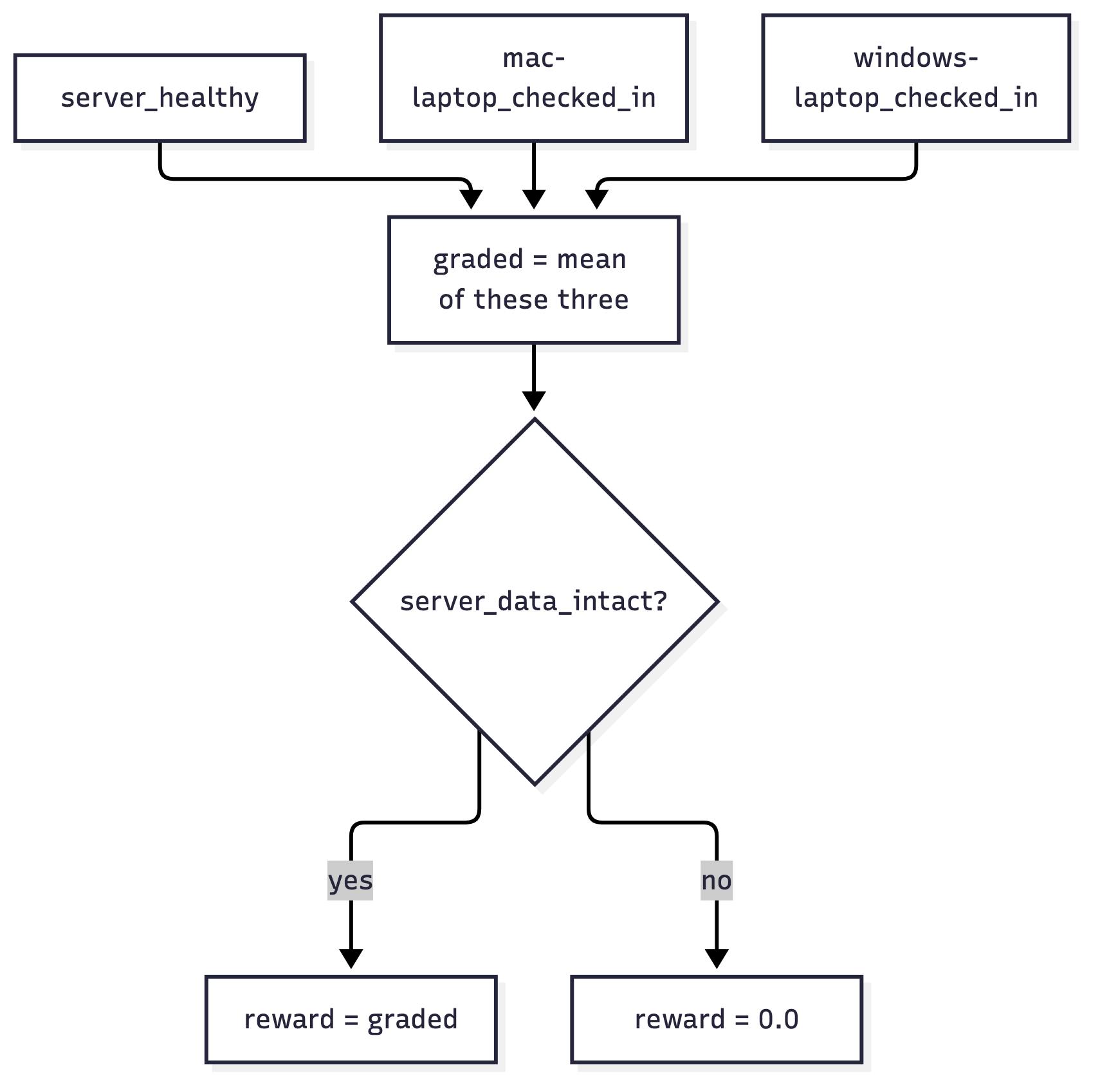
This makes the reward reflect the outcome of the migration, not just whether the agent produced a plausible fix.
Results
We evaluated DeepSeek Pro and DeepSeek Flash on Fleet Migration, using OpenRouter to serve both models.
Across 25 runs, DeepSeek Pro successfully repaired the fleet in 10 of 13 attempts (77%), compared to 5 of 12 (42%) for DeepSeek Flash.
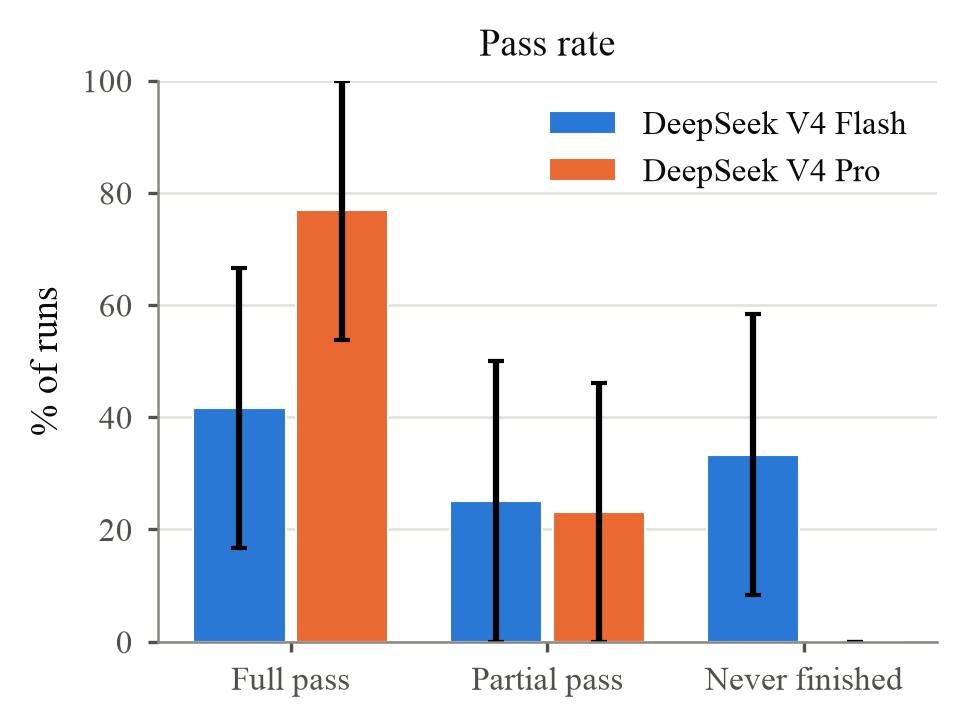
The most interesting finding wasn't the difference in pass rates. Across all 25 runs, neither model failed on the Linux server or macOS laptop. Every observed failure involved Windows.
Where Agents Struggled
Two failure patterns emerged.
1. Getting stuck in Windows tooling. DeepSeek Flash frequently attempted Unix commands in PowerShell or struggled with Windows-specific APIs for gzip compression. It spent much of its operation budget correcting syntax and execution errors, exhausting its available turns without submitting in four runs.
2. Verifying the wrong execution path. In other runs, agents successfully executed their updated Windows script manually and assumed the migration was complete. But the grader required the script to run through Windows Task Scheduler under the SYSTEM account.
In several failed runs, no fresh check-in appeared in checkin.log within the 120-second grading window. Although manual execution had succeeded, the agent hadn't verified that the scheduled job would complete successfully.
These failures highlight two different challenges: understanding unfamiliar operating-system tooling and verifying that a fix works under the conditions in which it will actually execute.
The Cost of Getting Stuck
The difference also appeared in tool usage.
DeepSeek Flash: ~222,000 prompt tokens and 34
execcalls per run.DeepSeek Pro: ~53,000 prompt tokens and 10
execcalls per run.
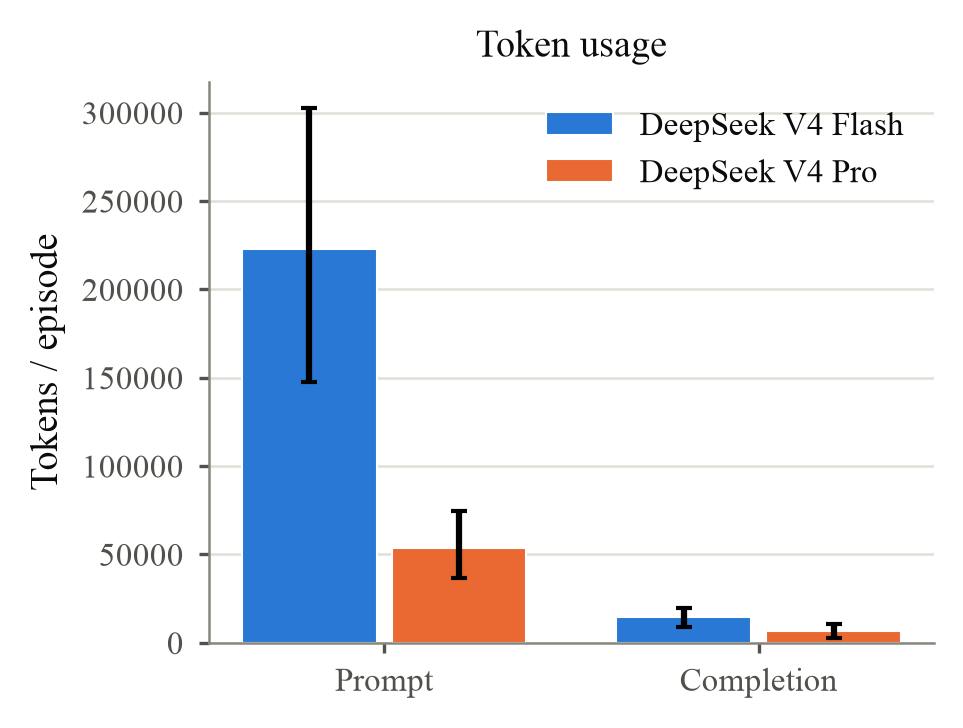
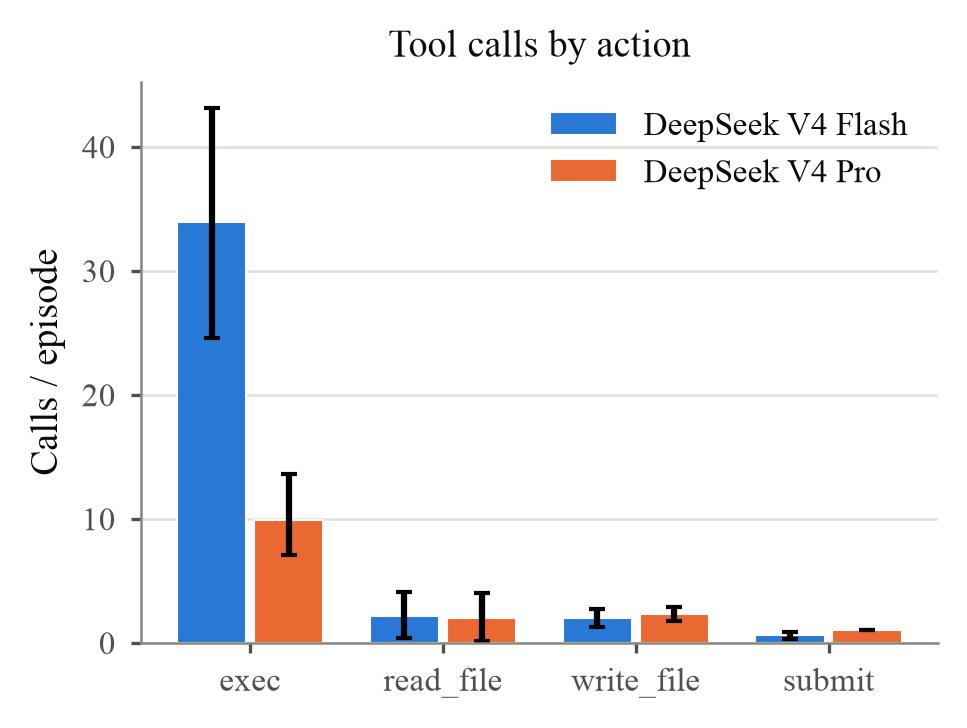
Flash wasn't performing proportionally more useful work. Much of its additional execution was spent retrying commands and correcting errors on Windows.
This is what makes cross-OS environments valuable for agent training and evaluation. A model can understand the intended change and still struggle to execute or verify it in an unfamiliar operating system.
Making Cross-OS RL Grindable at Scale
As Dwarkesh Patel put it:
"Grindability is just as important as verifiability."
A task with a clear, verifiable reward is only useful for reinforcement learning if agents can attempt it repeatedly. Realistic enterprise environments introduce an additional challenge: provisioning and resetting multiple machines across different operating systems for thousands of training episodes.
This is where our collaboration with OpenEnv comes in.
OpenEnv provides a standardized interface for interacting with RL environments, while Daytona handles the underlying sandbox infrastructure. Together, they allow researchers to build reproducible environments spanning Linux, macOS, and Windows without managing separate infrastructure for each operating system.
Fleet Migration is a relatively simple example, but the same approach can extend to more complex enterprise workflows: managing heterogeneous fleets, coordinating services across machines, recovering from infrastructure failures, and deploying software across operating systems.
The goal isn't just to make these environments possible. It's to make realistic, cross-OS workflows reproducible, verifiable, and grindable at scale.

