


Yutori just released Navigator n2, their flagship computer-use model. n2 can drive GUIs, CLIs, native apps, and live websites, interleaving them as necessary to find the shortest path through a computer for any task. And it does all that at frontier-level accuracy but at a much lower cost, pushing the accuracy-cost pareto for computer-use models. See the n2 blog for more details.
We worked with the Yutori team to power their model playground with Daytona sandboxes, so anyone could experience n2 in action.
The challenge with "try it" for computer use
The idea with the playground was for anyone to type in a prompt / task and watch n2 handle it on a real computer, live in their browser, without having to set anything up. Making this work for a large no. of concurrent sessions at low latencies is a deceptively hard piece of infrastructure.
Every session gets its own machine: an isolated VM with a full GUI, a running display server, and a mouse and keyboard the model can control. It has to start pristine: no trace of the previous visitor. And be fully torn down at the end. And it has to be fast, because if someone clicks "try it" and waits thirty seconds for a machine to boot, they leave.
Why Daytona makes sense
When someone opens the playground, Daytona provides a real VM, n2 takes control through the Computer-Use API, and the visitor watches the task execute live through a VNC stream in their browser.
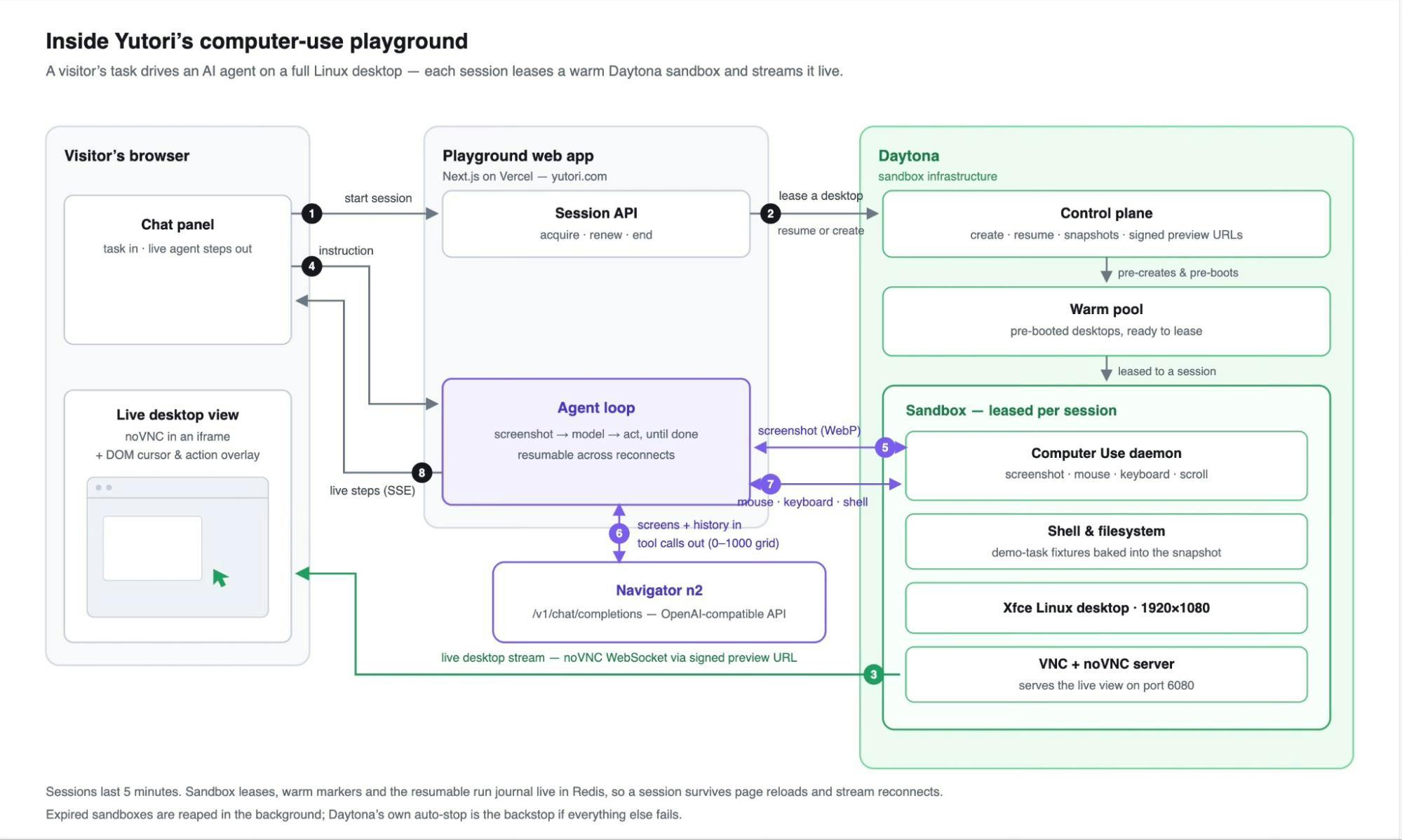
The playground is a Next.js app on Vercel — there are no long-running servers anywhere in the stack. When a visitor starts a session, a serverless function leases a Linux desktop from a pool of pre-booted Daytona sandboxes, created from a snapshot with the desktop environment and demo-task fixtures already baked in, so a full desktop appears in seconds rather than minutes. Daytona mints a signed preview URL for the sandbox's noVNC server, and the desktop streams straight into an iframe on the page.
When the visitor types a task, the agent loop takes over: it captures the screen through Daytona's Computer-Use API, sends the screenshot and conversation history to Navigator n2 over an OpenAI-compatible chat-completions API, and executes the tool calls that come back — mouse, keyboard, and shell — inside the sandbox through the Daytona SDK. The loop repeats until the task is done, and every step streams to the chat panel over SSE, drawn on top of the live desktop as a synthetic cursor and action bubbles.
Because the app is serverless, session state lives outside the functions: sandbox leases and a resumable run journal in Redis mean a run survives page reloads, stream rotations, and reconnects. Sessions on the marketing site last five minutes; expired sandboxes are reaped in the background, with Daytona's own auto-stop as the final backstop.
Building it
A big part of what made the integration fast is what's already inside each sandbox. Daytona images come pre-installed with LibreOffice, a browser, and — most importantly — a driver exposed through Daytona's Computer-Use API, so a model can screenshot, click, and type on the machine through authenticated API calls, with no custom agent to install and no security layer to build. A visitor can ask n2 to write a Python script, edit a spreadsheet, build a web page, or manipulate an image, and the tools it needs are already there.
Daytona also made it easy to bring real benchmark tasks directly into the playground. The playground's snapshot builds on the OSWorld environment image — the same environment the public benchmark uses — so visitors can run the very tasks used to evaluate and rank computer-use models, in the same environment where n2 was evaluated.
As the Yutori team put it:
Daytona handling the infra meant we didn't have to become experts in sandbox orchestration to ship a credible demo, we just had to make n2 good.
Try it
The Navigator Playground is live! You can try n2 on Yutori’s playground, run OSWorld benchmark tasks live.
Navigator Playground: yutori.com/n2
Daytona docs: daytona.io/docs