A guide to running Claude Managed Agents inside your own Daytona sandboxes, as a self-hosted environment.
Introduction
Section titled “Introduction”Claude Managed Agents is Anthropic’s configurable agent harness and infrastructure for running Claude as an autonomous agent. You define an agent (model, system prompt, tools, MCP servers), open a session, and stream events while the agent reads files, runs commands, and uses other tools to finish the task. By default, sessions run inside Anthropic-operated cloud containers.
A self-hosted environment moves that container layer to you. Everything else you get from Managed Agents stays unchanged: the agent loop, prompt caching, model calls, event stream, and session history all stay on Anthropic’s side. The container that holds the agent’s filesystem and shell runs on your infrastructure. With the Daytona integration, that container is a Daytona sandbox.
How the pieces fit together
Section titled “How the pieces fit together”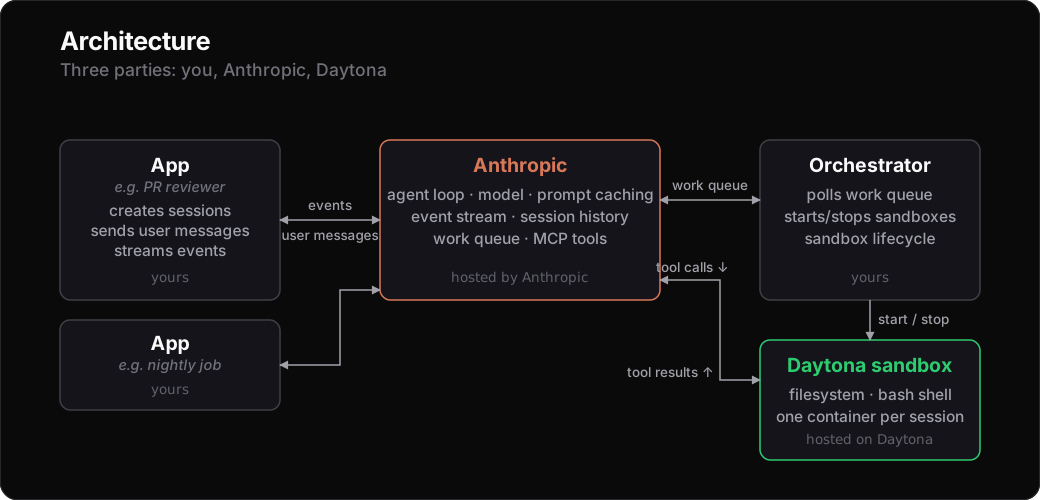
Three parties are involved in any session:
- Anthropic runs the API, the agent loop, and a per-environment work queue that signals when an agent has tools to dispatch.
- You run two things: an application that creates sessions and talks to your end users, and an orchestrator that manages the sandbox lifecycle (create, start, stop, clean up) and runs the agent’s tool runner inside each sandbox.
- Daytona provides the sandbox containers in which filesystem and shell tools execute.
When the agent decides to use a tool, where the call goes depends on the tool:
- Filesystem and shell tools (
bash,read,write,edit,glob,grep) are dispatched inside your Daytona sandbox. Your orchestrator ensures the agent’s tool runner is running there; the runner executes each call against the sandbox’s filesystem and shell and posts the result back to the session stream. - Web tools (
web_search,web_fetch) and MCP server tools are dispatched by Anthropic server-side. MCP calls use credentials held in Anthropic-managed vaults. The sandbox is not involved.
This split means that a self-hosted environment changes where filesystem and shell tools run, and nothing else.
Each session gets its own isolated sandbox: filesystem changes persist across tool calls within the session, and while a single runner is alive the bash shell also keeps its working directory, environment, and background processes between calls.
What you set up
Section titled “What you set up”Reference implementation
Section titled “Reference implementation”A reference implementation of the orchestrator, the in-sandbox runner, the snapshot builder, and example agents is provided in the Daytona repo at guides/python/claude/claude-managed-agents/. Each section below points to the concrete file in that directory.
To follow along locally:
git clone https://github.com/daytonaio/daytona.gitcd daytona/guides/python/claude/claude-managed-agents
python3.12 -m venv .venvsource .venv/bin/activate
pip install -e .
If you plan to run the reference webhook orchestrator, install with the webhook extras instead: pip install -e ".[webhook]".
On the Anthropic side
Section titled “On the Anthropic side”- Create a self-hosted environment. In the Claude Console, open Workspace → Environments → New → Self-hosted, or from code:
import anthropic
env = anthropic.Anthropic().beta.environments.create( name="my-daytona-env", config={"type": "self_hosted"})-
Generate an environment key for the environment from the Console. This key authenticates the whole worker flow (poll, ack, stop, heartbeat, session event stream, skill download) for this one environment. Keep it on the orchestrator host only.
-
Create your agent as you would for any Managed Agents setup. The agent does not need to know it will run on a self-hosted environment; that is decided per session. The reference’s
create_agent.py <name>is a one-liner for spinning up a sandbox-tools-only testing agent and printing its id.
On the Daytona side
Section titled “On the Daytona side”Daytona provides the per-session sandbox containers and the snapshot mechanism your orchestrator uses. You’ll need a Daytona account and API key.
The reference’s build_default_snapshot.py builds a sandbox image from Dockerfile.default and publishes it as a snapshot in your Daytona workspace. The Dockerfile mirrors the runtimes from Claude Managed Agents’ container reference. Run the script once; from then on, the orchestrator creates a sandbox per session from that snapshot, on demand.
At its core the script wraps a single Daytona SDK call:
from daytona import CreateSnapshotParams, Daytona, Image, Resources
Daytona().snapshot.create(    CreateSnapshotParams(        name="daytona-env-default",        image=Image.from_dockerfile("Dockerfile"),        resources=Resources(cpu=2, memory=8, disk=10),    ),    on_logs=lambda chunk: print(chunk, end="", flush=True),)
To change what’s installed in the sandbox, edit Dockerfile.default and rerun the script. It hashes the Dockerfile, names the snapshot byoc-env-default-<sha8>, and no-ops if a snapshot with that exact hash already exists.
Running the orchestrator
Section titled “Running the orchestrator”The orchestrator process
Section titled “The orchestrator process”You run an orchestrator as a long-lived process. Its responsibilities:
- Watch the environment’s work queue, either by long-polling it or by receiving webhooks from Anthropic on each new turn.
- For each work item, ensure a Daytona sandbox is running and start the agent’s tool runner inside it. The runner attaches to the session’s event stream and answers
bash,read,write,edit,glob,grepagainst the sandbox. - Stop sandboxes that have gone idle past a configurable threshold, and start them back up on the next work item. The sandbox’s filesystem survives the pause, so a session can sit quiet between bursts of activity without keeping a sandbox running. Sandboxes that stay stopped for 30 days are deleted; activity restarts the timer.
- Archive sandboxes when their session terminates. The filesystem stays in Daytona’s cost-effective object storage until the same 30-day window expires, then the sandbox is deleted.
The reference includes two orchestrator variants:
host_orchestrator_polling.pylong-polls the work queue and only needs the environment key, so it works against environments behind any kind of NAT or firewall.host_orchestrator_webhook.pyis a FastAPI receiver that drains the queue on eachsession.status_run_starteddelivery; it needs a publicly reachable URL and anANTHROPIC_WEBHOOK_SECRET, but it avoids continuous polling.
Both share the same sandbox-lifecycle logic.
The per-work-item path looks roughly like this (the reference’s orchestrator_lib.py adds dedupe, ack, retries, locking, and the janitor thread):
from daytona import CreateSandboxFromSnapshotParams, Daytona, DaytonaNotFoundError
daytona = Daytona()
def handle_work(work):    session_id = work.data.id    name = f"byoc-{session_id}"    try:        sb = daytona.get(name)    except DaytonaNotFoundError:        sb = daytona.create(CreateSandboxFromSnapshotParams(            name=name,            snapshot="byoc-env-default",            labels={"byoc.session_id": session_id},        ))    if sb.state in ("stopped", "archived"):        sb.start()
    sb.fs.upload_file(open("sandbox_runner.py", "rb").read(),                      "/home/daytona/sandbox_runner.py")    sb.process.exec("pip install --user anthropic")    sb.process.exec(        f"ANTHROPIC_ENVIRONMENT_KEY={environment_key} "        f"ANTHROPIC_WORK_ID={work.id} ANTHROPIC_SESSION_ID={session_id} "        f"ANTHROPIC_ENVIRONMENT_ID={environment_id} "        "nohup python3 /home/daytona/sandbox_runner.py &"    )
The orchestrator needs the environment key and a Daytona API key (plus an ANTHROPIC_WEBHOOK_SECRET if you run the webhook receiver). It does not need any user-facing credentials, and it does not need to know about your application.
The in-sandbox runner
Section titled “The in-sandbox runner”The “agent’s tool runner” the orchestrator launches is a small Python process. The Anthropic SDK ships an EnvironmentWorker that composes skill download, tool dispatch, heartbeating the work-item lease, and the force-stop on exit. All the runner has to do is call handle_item(), for example:
import asyncioimport os
from anthropic import AsyncAnthropic

async def main():    environment_key = os.environ["ANTHROPIC_ENVIRONMENT_KEY"]    async with AsyncAnthropic(auth_token=environment_key) as client:        await client.beta.environments.work.worker(            environment_key=environment_key,            workdir="/mnt/session",        ).handle_item()

asyncio.run(main())
handle_item() reads ANTHROPIC_SESSION_ID, ANTHROPIC_WORK_ID, and ANTHROPIC_ENVIRONMENT_ID from the environment, then attaches to the session’s event stream and runs the agent’s tool calls against the six filesystem and shell tools (bash, read, write, edit, glob, grep) rooted at workdir. It heartbeats the work-item lease while the agent runs, and force-stops the lease on exit.
The environment key (passed in by the orchestrator) is the only credential this process needs to talk to Anthropic. It’s scoped to a single environment: the runner can act on sessions in that environment, and nothing else in your Anthropic account. For multi-tenant deployments, give each tenant its own environment.
Running applications
Section titled “Running applications”Driving a session
Section titled “Driving a session”It’s the same as for a cloud environment; the only difference is environment_id points at your self_hosted environment.
session = client.beta.sessions.create( agent=agent_id, environment_id="env_01..." # your self-hosted env)Open the events stream before sending the first user message:
with client.beta.sessions.events.stream(session.id) as stream: client.beta.sessions.events.send( session.id, events=[{"type": "user.message", "content": [{"type": "text", "text": "what's installed in this container? versions please"}]}], ) for ev in stream: # render events as they arrive; # session.status_idle marks end of turn. ...See Events and streaming for the full event vocabulary and richer examples.
Mounting session resources
Section titled “Mounting session resources”You are responsible for mounting session resources, for example files or GitHub repositories. Shared dependencies can be baked into your container image. For per-session state, the orchestrator reads two keys off session.metadata:
daytona.snapshot_name: create this session’s sandbox from a named Daytona snapshot instead of your default. Use this when different sessions need different toolchains or pre-installed packages.daytona.sandbox_id: attach an already-prepared Daytona sandbox instead of creating one. Use this when you need to seed per-session state before the agent starts, like cloning a repo, loading a dataset, or mounting a customer-specific volume.
The two keys are mutually exclusive.
session = client.beta.sessions.create( agent=agent_id, environment_id="env_01...", metadata={"daytona.sandbox_id": "<sandbox-id>"},)For the prepared-sandbox path, create the sandbox with the right labels before passing its id in session.metadata:
from daytona import CreateSandboxFromSnapshotParams, Daytona
sb = Daytona().create(CreateSandboxFromSnapshotParams(    snapshot="byoc-env-default",    labels={        "byoc.environment_id": "env_01...",        "byoc.mode": "prepared",    },))# do any per-session prep here (clone a repo, load data, ...)# then pass sb.id as session.metadata["daytona.sandbox_id"]
sb.set_labels({...}) does the same on an already-created sandbox, if you’d rather prepare first and label last.
When the session arrives the orchestrator validates the labels, binds the sandbox by setting byoc.session_id and flipping byoc.mode to in-sandbox, then installs and starts its runner. The sandbox can be in any state at handoff; the orchestrator starts it first.
Custom snapshots and prepared sandboxes must include the runner prerequisites the in-sandbox worker needs. A minimal working Daytona snapshot, included in the reference as Dockerfile.minimal, is just:
FROM python:3.12-slim
RUN apt-get update \    && apt-get install -y --no-install-recommends \        util-linux procps mawk \    && rm -rf /var/lib/apt/lists/* \    && mkdir -p /home/daytona /mnt/session \    && chmod 777 /home/daytona /mnt/session
WORKDIR /mnt/sessionMCP servers and vaults
Section titled “MCP servers and vaults”MCP servers and Anthropic-managed vaults work on self-hosted environments without changes. The agent declares the MCP server in its mcp_servers list, vault-held credentials are referenced by id, and the call is proxied by Anthropic server-side. Your sandbox is not in the path. This is what lets a single agent mix sandbox-routed tools (a bash against your Daytona sandbox) with MCP-proxied tools (a query against, say, Linear) on one event stream.
What you get
Section titled “What you get”- The sandbox is yours to do whatever else you want with. Beyond running the agent’s tool runner, you can shell into the container, mount volumes, pre-install per-customer code, warm caches, run sidecar processes, attach observability. The runner is one process in a container that you own end to end.
- Build your sandbox snapshot however you like. From a Dockerfile or Daytona’s declarative builder: whatever language versions, system packages, or in-house tools the agent needs goes in there.
- Switching to cloud is one line. Point
environment_idat a cloud environment and thesessions.create/events.streamloop is unchanged. Thesession.metadatakeys are the only Daytona-specific part — drop them and use the cloud equivalents: environment setup for the container customization, and the Files API for per-session inputs.