Reinforcement learning from verified rewards is driving rapid progress in reasoning, tool use, and code generation. Agents interact with environments that provide ground-truth feedback, but this requires scalable, isolated environments that can run in parallel. OpenEnv is a framework for building and serving RL environments that addresses this, decoupling the environment from the training loop so each instance can run in its own container. It has native support for Daytona sandboxes, enabling parallel execution across many isolated instances.
This guide demonstrates the OpenEnv + Daytona integration through FinQA, a multi-turn, tool-calling environment contributed by Snorkel AI to OpenEnv. FinQA presents the model with financial questions based on SEC 10-K filings and gives it SQL tools to explore the underlying data before submitting an answer.
1. OpenEnv and Daytona
Section titled “1. OpenEnv and Daytona”OpenEnv environments are standalone servers that expose a Gymnasium-style API (reset, step, state) over the network. The environment logic (e.g. a FinQA database with SQL tools, a code execution sandbox, a web browsing agent) runs inside a container; the training loop connects as a remote client. This separation means the environment and the trainer don’t need to share a process, a machine, or even a language; they communicate over a standard protocol.
In MCP-enabled environments like FinQA, tools are exposed via MCP (Model Context Protocol) over JSON-RPC. Clients discover available tools at runtime via tools/list and invoke them via tools/call. This is how the model’s tool calls in the training loop get routed to the actual environment running inside a container.
OpenEnv has a pluggable provider model for where environments run: local Docker, Docker Swarm, or Daytona. The DaytonaProvider launches each environment instance as a Daytona sandbox, which gives you API-driven lifecycle management and the ability to run thousands of instances in parallel without local infrastructure. In the training loop below, each sandbox is an independent FinQA environment with its own persistent WebSocket connection.
2. Workflow Overview
Section titled “2. Workflow Overview”We cover two modes of using the FinQA environment:
run.py— A single-episode demo that creates one sandbox, runs one complete interaction, and tears down. Useful for understanding the environment and verifying your setup.train.py— A full GRPO training loop that creates 500 sandboxes, collects multi-turn rollouts in parallel with batched vLLM generation, runs policy gradient updates with LoRA, and hot-swaps adapters into vLLM between iterations.
Both modes use the same underlying episode structure. Each episode is a multi-turn, tool-calling interaction:
- Reset: A sandbox starts a new episode with a random financial question about a company
- Explore: The model calls tools to discover tables, inspect schemas, and run SQL queries against that company’s 10-K data
- Submit: After gathering enough data, the model calls
submit_answerwith its computed answer - Reward: The environment returns a binary reward (1.0 = correct, 0.0 = wrong)
The available tools are:
| Tool | Description |
|---|---|
get_descriptions(company_name) | List available tables for a company |
get_table_info(company_name, table_name) | Get column names and types |
sql_query(query) | Run a SQL query against the company’s 10-K data |
submit_answer(answer) | Submit a final answer (terminates the episode) |
3. Setup
Section titled “3. Setup”Clone the Repository
Section titled “Clone the Repository”Clone the Daytona repository and navigate to the example directory:
git clone https://github.com/daytonaio/daytona.gitcd daytona/guides/python/reinforcement-learning/openenvCreate Virtual Environment
Section titled “Create Virtual Environment”python3.10 -m venv venvsource venv/bin/activate # On Windows: venv\Scripts\activateInstall Dependencies
Section titled “Install Dependencies”pip install -e .This installs:
daytona- Daytona SDK for sandbox managementopenenv-core- OpenEnv runtime (WebSocket-based RL environment protocol)openenv-finqa-env- The FinQA environment client (FinQAEnv,CallToolAction)python-dotenv- Environment variable management
For training, also install the training extras:
pip install -e ".[train]"This adds: torch, transformers, vllm, peft (for LoRA), and numpy. See Running the Training for additional system requirements before starting train.py.
Configure Environment
Section titled “Configure Environment”Get your Daytona API key from the Daytona Dashboard and create a .env file:
DAYTONA_API_KEY=your_daytona_api_keyBuild the Snapshot
Section titled “Build the Snapshot”Before running any episodes, build a Daytona snapshot that pre-packages the FinQA environment server and dataset:
python build_snapshot.py# Or, with a custom snapshot name:python build_snapshot.py --snapshot-name my-finqaThis uses Daytona’s declarative Image API to clone the FinQA environment from the OpenEnv repo, install its dependencies, and pre-download the FinQA dataset from HuggingFace, all baked into a single container image for fast sandbox startup.
4. Running a Single Episode
Section titled “4. Running a Single Episode”The run.py script demonstrates the full OpenEnv + Daytona integration in a single episode. Run it with:
python run.pyLet’s walk through the key components.
Sandbox Creation
Section titled “Sandbox Creation”The DaytonaProvider from OpenEnv wraps the Daytona SDK, creating a sandbox from the pre-built snapshot and waiting for the FinQA server to become healthy:
from openenv.core.containers.runtime.daytona_provider import DaytonaProvider
def create_sandbox():    provider = DaytonaProvider(auto_stop_interval=0, cmd=SERVER_CMD)    url = provider.start_container(f"snapshot:{SNAPSHOT}")
    provider.wait_for_ready(url, 120)    return provider, url
Connecting to the Environment
Section titled “Connecting to the Environment”OpenEnv communicates over WebSocket. The FinQAEnv client handles the connection, and env.reset() starts a new episode with a random question:
from finqa_env import CallToolAction, FinQAEnv
async with FinQAEnv(base_url=url) as env:    await env.reset()
    # Get the question and company for this episode    state = await env._send_and_receive({"type": "state"})    data = state.get("data", {})    question = data.get("current_question", "")    company = data.get("current_company", "")
Two API Styles
Section titled “Two API Styles”OpenEnv provides two ways to interact with the environment:
call_tool() — for exploration, returns the raw result with no RL tracking:
# Discover available tablesdescriptions = await env.call_tool("get_descriptions", company_name=company)table_names = json.loads(descriptions)
# Inspect a table's schematable_info = await env.call_tool(    "get_table_info", company_name=company, table_name=table_names[0])
step() — wraps the tool call in an RL-style StepResult with .observation.done and .observation.reward:
# Run a SQL query (with RL reward/done tracking)query = f'SELECT * FROM "{table_names[0]}" LIMIT 5'step_result = await env.step(    CallToolAction(tool_name="sql_query", arguments={"query": query}))obs = step_result.observationprint(f"SQL result (done={obs.done}, reward={obs.reward})")
# Submit a final answer (terminates the episode)step_result = await env.step(    CallToolAction(tool_name="submit_answer", arguments={"answer": "0"}))obs = step_result.observationprint(f"Submitted (done={obs.done}, reward={obs.reward})")
Use call_tool() when exploring, and step() when you need reward/done signals (e.g., in a training loop).
Expected Output
Section titled “Expected Output”Creating sandbox from snapshot 'openenv-finqa'...Waiting for server health check... Server healthy.
Question: What was the total revenue for fiscal year 2023?Company: ExampleCorpTables: ['income_statement', 'balance_sheet', 'cash_flow']Schema: {"columns": [{"name": "fiscal_year", "type": "INTEGER"}, ...]}
SQL result (done=False, reward=0.0): [{"fiscal_year": 2023, "revenue": 45200, ...}, ...]
Submitted (done=True, reward=0.0)
============================================================Episode complete Question: What was the total revenue for fiscal year 2023? Reward: 0.0 Steps: 2============================================================
Cleaning up sandbox...Done.5. Understanding the Training Code
Section titled “5. Understanding the Training Code”The train.py script (~1800 lines) implements end-to-end GRPO training with parallel rollout collection across hundreds of sandboxes. Let’s walk through its key components.
System Prompt
Section titled “System Prompt”The model is instructed to act as a financial analyst, using tools iteratively to gather data before answering:
SYSTEM_PROMPT = """\You are a financial analyst assistant answering questions about SEC 10-K filings.
Think and reason step by step. Iteratively gather data using the available tools until you have enough information to answer the question.
When submitting your final answer:- Provide ONLY the numerical value. No explanations, units, or LaTeX formatting.- Always express percentages, growth rates, and percentage point differences as decimal ratios by dividing by 100 (e.g., 22% → 0.22, -8.9% → -0.089, a 4.5 percentage point difference → 0.045).- Submit numbers exactly as they appear in the query results. Do not convert units (e.g., if the table shows values in millions, submit the number as-is, not multiplied out).- For multi-year answers, use: year: value, year: value (e.g., 2022: 0.933, 2023: 0.930, 2024: 0.931)- For year-over-year changes, use: year to year: value (e.g., 2022 to 2023: 0.189, 2023 to 2024: 0.025)- For single values, just submit the number (e.g., 0.895 or -77 or 63)- If the question is yes/no, answer Yes or No"""
Tool Schema Fetching
Section titled “Tool Schema Fetching”Tool schemas are fetched dynamically from a connected environment via MCP JSON-RPC over WebSocket, then converted to OpenAI function-calling format for use with the chat template:
async def fetch_tools_from_env(env: FinQAEnv) -> list[dict]: resp = await env._send_and_receive( { "type": "mcp", "data": {"jsonrpc": "2.0", "method": "tools/list", "params": {}, "id": 1}, } ) mcp_tools = resp["data"]["result"]["tools"] # Convert each tool to OpenAI function-calling format openai_tools = [] for t in mcp_tools: schema = t.get("inputSchema") or t.get("input_schema") or {} properties = {} required = [] if "properties" in schema: for name, prop in schema["properties"].items(): properties[name] = { "type": prop.get("type", "string"), "description": prop.get("description", ""), } required = schema.get("required", []) openai_tools.append( { "type": "function", "function": { "name": t["name"], "description": t.get("description", ""), "parameters": { "type": "object", "properties": properties, "required": required, }, }, } ) return openai_toolsSandbox Pool Management
Section titled “Sandbox Pool Management”The training creates hundreds of sandboxes upfront from the pre-built snapshot, with staggered launches to stay under API rate limits:
async def create_sandbox_pool(    n: int, snapshot_name: str, semaphore: asyncio.Semaphore):    pool_by_idx: list[tuple | None] = [None] * n
    async def create_one(idx: int):        async with semaphore:            provider = DaytonaProvider(auto_stop_interval=0, cmd=SERVER_CMD)            url = await asyncio.to_thread(                provider.start_container, f"snapshot:{snapshot_name}"            )            for attempt in range(3):                try:                    await asyncio.to_thread(provider.wait_for_ready, url, 120)                    break                except Exception:                    if attempt == 2:                        raise                    await asyncio.sleep(3)            pool_by_idx[idx] = (provider, url)
    # Stagger launches (10 at a time with 1s sleep) to stay under rate limits    tasks = []    for i in range(n):        tasks.append(asyncio.create_task(create_one(i)))        if (i + 1) % 10 == 0:            await asyncio.sleep(1.0)    await asyncio.gather(*tasks, return_exceptions=True)    return [entry for entry in pool_by_idx if entry is not None]
After creation, persistent WebSocket connections are opened to all sandboxes with extended ping timeouts to survive long vLLM generation steps:
async def connect_envs(pool, play_sem: asyncio.Semaphore) -> list[FinQAEnv]:    envs: list[FinQAEnv | None] = [None] * len(pool)
    async def connect_one(i: int, url: str):        async with play_sem:            env = FinQAEnv(base_url=url)            await env.connect()            # Extend ping timeout to survive long vLLM generation steps            if hasattr(env, "_ws") and env._ws is not None:                env._ws.ping_timeout = 300            envs[i] = env
    await asyncio.gather(        *[connect_one(i, url) for i, (_, url) in enumerate(pool)]    )    return [env for env in envs if env is not None]
With 500 long-lived WebSocket connections, some will inevitably go stale mid-training (network blips, server-side timeouts, etc.). The reconnect_envs function runs a periodic health-check sweep: it sends a lightweight state ping to every connection, and any socket that doesn’t respond within 5 seconds gets closed and replaced. Connections with in-flight episode requests are skipped to avoid WebSocket message interleaving, where a ping response and a step response arrive on the same socket and get delivered to the wrong awaiter:
async def reconnect_envs(    envs: list[FinQAEnv], pool, skip_indices: set[int] | None = None,) -> list[FinQAEnv]:    reconnected = 0    skip = skip_indices or set()
    async def check_and_reconnect(i: int):        nonlocal reconnected        env = envs[i]        try:            # Quick health check — if the WS is alive this returns fast            await asyncio.wait_for(                env._send_and_receive({"type": "state"}), timeout=5.0            )        except Exception:            # Connection is dead — close and reopen            try:                await env.close()            except Exception:                pass            _, url = pool[i]            new_env = FinQAEnv(base_url=url)            await new_env.connect()            if hasattr(new_env, "_ws") and new_env._ws is not None:                new_env._ws.ping_timeout = 300            envs[i] = new_env            reconnected += 1
    await asyncio.gather(        *[check_and_reconnect(i) for i in range(len(envs)) if i not in skip],        return_exceptions=True,    )
Multi-Turn Rollout Collection
Section titled “Multi-Turn Rollout Collection”The collect_rollouts function is the heart of the training loop (~430 lines). It keeps all sandboxes continuously occupied, using a sophisticated async event loop:
- Dynamic refill: As soon as one episode finishes on a sandbox, a new one starts immediately
- Batched vLLM generation: Episodes waiting for a model response are accumulated and dispatched to vLLM as a single batch for throughput
- Tool call parsing: Model outputs are parsed for tool calls (Hermes-style XML, raw JSON, or bare-answer fallback)
- Forced termination: Episodes exceeding
MAX_EPISODE_STEPS(default 20) get a forcedsubmit_answer("unknown")
The flow for a single episode within the rollout engine:
# 1. Start an episode on an idle sandboxasync def start_episode(env_idx: int) -> ActiveEpisode:    env = envs[env_idx]    await env.reset()    state = await env._send_and_receive({"type": "state"})    question = state["data"]["current_question"]    company = state["data"]["current_company"]    chat_history = [        {"role": "system", "content": SYSTEM_PROMPT},        {"role": "user", "content": f"Company: {company}\nQuestion: {question}"},    ]    return ActiveEpisode(env=env, sandbox_idx=env_idx,                         chat_history=chat_history, ...)
# 2. Build prompt and generate with vLLM (batched across all ready episodes)prompt_str = build_chat_prompt(tokenizer, ep.chat_history)outputs = vllm_model.generate(prompts=prompts, sampling_params=params)
# 3. Parse tool call from generated texttool_name, tool_args = parse_tool_call(generated_text)
# 4. Execute in the sandboxresult = await ep.env.step(CallToolAction(tool_name=tool_name, arguments=tool_args))
# 5. If not done: append to chat history, re-enter ready queue# If done or max steps: capture reward, mark sandbox as idle
The parse_tool_call function handles multiple output formats from the model:
def parse_tool_call(text: str) -> tuple[str, dict]:    # Pattern 1: Hermes-style XML    # <tool_call>{"name": "sql_query", "arguments": {"query": "..."}}</tool_call>    m = re.search(r"<tool_call>\s*(\{.*?\})\s*</tool_call>", text, re.DOTALL)    if m:        data = json.loads(m.group(1))        # ... extract name and arguments
    # Pattern 2: Raw JSON objects    for data in iter_json_objects(text):        # ... try to extract from {"name": ..., "arguments": ...} format
    # Pattern 3: Bare answer after </think> tag    # Pattern 4: Text that looks like a number/short answer    # Fallback: submit_answer({"answer": "unknown"})
Stale WebSocket Cleanup After Cancellation
Section titled “Stale WebSocket Cleanup After Cancellation”When rollout collection reaches its target episode count, it cancels any in-flight tasks (episode starts, step requests, forced terminations). But cancellation creates a subtle problem: cancelled tasks leave stale responses queued on their WebSocket connections. If the next iteration reuses that socket, a step response could pick up a stale message from a cancelled task, corrupting the episode.
To prevent this, the code tracks which envs had in-flight WebSocket requests at cancellation time, then force-disconnects those specific sockets. The next reconnect_envs() call reopens them cleanly:
# Cancel excess in-flight work once target sample count is reachedpending_cancel = list(start_tasks.keys()) + list(step_tasks.keys()) + list(force_tasks.keys())
# Track envs with in-flight WS requests — cancellation leaves stale# responses queued on the socket, corrupting subsequent communicationstale_env_indices = set()for env_idx in start_tasks.values():    stale_env_indices.add(env_idx)for meta in step_tasks.values():    stale_env_indices.add(meta[0].sandbox_idx)for fep in force_tasks.values():    stale_env_indices.add(fep.sandbox_idx)
for task in pending_cancel:    task.cancel()await asyncio.gather(*pending_cancel, return_exceptions=True)
# Force-disconnect envs whose WebSocket has stale responses from# cancelled tasks. The next reconnect_envs() will reopen them cleanly.for idx in stale_env_indices:    try:        await envs[idx].disconnect()    except Exception:        pass
GRPO: Grouping and Advantages
Section titled “GRPO: Grouping and Advantages”Episodes are grouped by the same question (identified by question_id). Groups must be exact size (default 6). Leftover episodes carry over to the next iteration:
def build_strict_prompt_groups(    episodes: list[Episode], group_size: int) -> tuple[list[list[Episode]], list[Episode]]:    buckets: dict[tuple[str, str], list[Episode]] = defaultdict(list)    for ep in episodes:        buckets[episode_prompt_key(ep)].append(ep)
    groups, leftovers = [], []    for bucket in buckets.values():        n_full = len(bucket) // group_size        for i in range(n_full):            groups.append(bucket[i * group_size : (i + 1) * group_size])        leftovers.extend(bucket[n_full * group_size :])    return groups, leftovers

def compute_group_advantages(groups: list[list[Episode]]) -> list[list[float]]:    all_advantages = []    for group in groups:        rewards = np.array([ep.reward for ep in group])        std = float(np.std(rewards))        if len(group) > 1 and std > 1e-8:            mean = float(np.mean(rewards))            advs = (rewards - mean) / (std + 1e-8)        else:            advs = np.zeros_like(rewards)  # No gradient signal        all_advantages.append([float(a) for a in advs])    return all_advantages
Within each group, advantages are computed as standard GRPO normalization: (reward - mean) / std. If all episodes in a group got the same reward, advantages are zero (no gradient signal from that group).
GRPO Policy Gradient Update
Section titled “GRPO Policy Gradient Update”The update processes each episode’s turns as individual training samples. The loss per turn is -(advantage * policy_logprob):
def grpo_update(    train_model, optimizer, episodes_flat, advantages_flat, batch_size=12) -> float:    train_model.train()    optimizer.zero_grad(set_to_none=True)
    # Flatten episodes into turn-level samples, sorted by length    # for efficient padding    for start in range(0, len(turn_samples), batch_size):        chunk = turn_samples[start : start + batch_size]
        # Pad and create attention masks        outputs = train_model(input_ids=input_t, attention_mask=attn_mask)
        # Extract completion logprobs        nll = F.cross_entropy(completion_logits, comp_targets, reduction="none")        policy_lps = -nll
        # GRPO loss: -(advantage * logprob) weighted by token count        token_loss = (-adv_t * policy_lps) * valid_mask        batch_loss = (token_loss * scale_t).sum()        batch_loss.backward()
    torch.nn.utils.clip_grad_norm_(train_model.parameters(), max_norm=1.0)    optimizer.step()
LoRA Hot-Swap
Section titled “LoRA Hot-Swap”After each training iteration, the updated LoRA adapter is exported and loaded into vLLM for the next rollout. This ensures rollouts always use the freshly updated policy:
def export_lora_adapter(train_model, export_root, iteration) -> str:    out_dir = os.path.join(export_root, f"iter_{iteration:04d}")    train_model.save_pretrained(out_dir)    return out_dir
# In the training loop:if new_lora_dir:    active_lora_request = lora_request_cls(        f"grpo_iter_{it + 1}", lora_request_seq, new_lora_dir    )    # Future vLLM generations use the new adapter automatically
GPU Layout and Lag-1 Pipeline
Section titled “GPU Layout and Lag-1 Pipeline”The training uses a 4-GPU setup with clear separation:
- GPUs 0-1: vLLM with tensor parallelism (TP=2) for fast batched generation during rollouts
- GPUs 2-3: Base model + LoRA with
device_map="auto"for training
The training loop overlaps iteration N’s gradient update (on GPUs 2-3) with iteration N+1’s rollout collection (on GPUs 0-1):
for it in range(args.iterations):    batch = prepared_batch
    # 1. Start GRPO update on a background thread (uses GPUs 2-3)    update_task = asyncio.create_task(        asyncio.to_thread(            run_grpo_update_and_maybe_export,            train_model, optimizer, batch, ...        )    )
    # 2. While train GPUs are busy, prepare next batch (uses GPUs 0-1)    if it + 1 < args.iterations:        prepared_batch = await prepare_train_batch(            envs=envs, pool=pool, vllm_model=vllm_model, ...        )
    # 3. Await the update, hot-swap LoRA adapter into vLLM    loss, new_lora_dir = await update_task    if new_lora_dir:        active_lora_request = lora_request_cls(            f"grpo_iter_{it + 1}", lora_request_seq, new_lora_dir        )
6. Running the Training
Section titled “6. Running the Training”Start training with:
python train.pyFor a quick smoke test with minimal resources:
python train.py --sandboxes 2 --iterations 1 --group-size 2You’ll see output like:
Creating 500 sandboxes from snapshot 'openenv-finqa' ...All 500 sandboxes ready.
Connecting to sandboxes ...All 500 connections ready.
Tools: ['get_descriptions', 'get_table_info', 'sql_query', 'submit_answer']
  iter   accuracy   avg_steps       loss   groups     eps/s     time------------------------------------------------------------------------  1/10      0.082        8.3     0.0234       100     12.5     480s  2/10      0.117        7.9     0.0198       100     13.1     458s  ...
After training completes, artifacts are saved to runs/YYYYMMDD_HHMMSS/:
config.json— Full training configurationmetrics.jsonl— Per-iteration metrics (accuracy, loss, eps/sec, etc.)rollouts.jsonl— Per-round rollout summariestrajectories.jsonl— Every episode with all turns (tool calls, results, reward)
7. Training Results
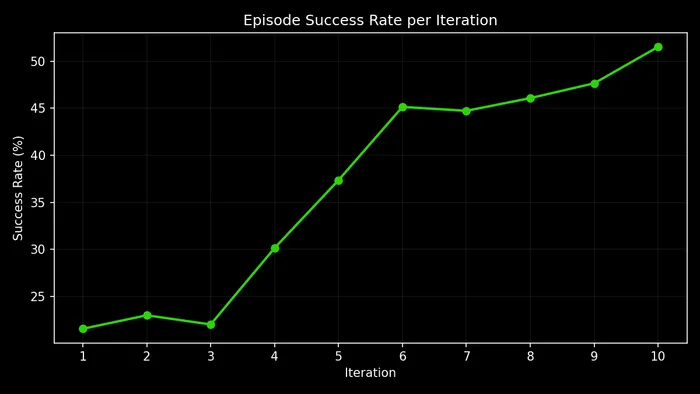
Section titled “7. Training Results”We ran a full training run with default parameters (--sandboxes 500 --iterations 10 --group-size 6), training Qwen3-14B with LoRA on the FinQA task. Each episode presents the model with a financial question about a real company’s SEC 10-K filing. Questions like:
- “What is the year-over-year percentage growth in Total Revenues from fiscal year 2023 to fiscal year 2024?” (Walmart)
- “What is the ratio of Domestic Income to Foreign Income for continuing operations before income taxes in 2022?” (Alphabet)
- “What fraction of the finance lease liability balance is due in the next twelve months?” (Alphabet)
- “What is the net change in gross unrecognized tax benefits for the year ended December 31, 2024?” (Alphabet)
The model must use the available tools to discover tables, inspect schemas, run SQL queries, and compute a final answer — receiving a binary reward (1.0 = correct, 0.0 = wrong). Over 10 iterations (~1,000 episodes each), accuracy more than doubled:
What Did the Model Actually Learn?
Section titled “What Did the Model Actually Learn?”The model did not learn a fundamentally new strategy for navigating financial databases. From iteration 1 onward, it already followed the correct pipeline: get_descriptions → get_table_info → sql_query → submit_answer. Average turn count barely changed (4.5 → 4.8). Most of the training’s impact came from two specific behavioral fixes that removed systematic failure modes, plus a set of subtler improvements in data interpretation.
The Year-Column Quoting Fix
Section titled “The Year-Column Quoting Fix”This was the single biggest win. The FinQA database uses year strings as column names ("2024", "2023", "2022"). In SQLite, writing SELECT 2024 FROM table returns the integer literal 2024, not the data in column "2024". The correct syntax is SELECT "2024" FROM table.
In early training, the model consistently wrote unquoted year columns:
-- Iteration 1: Unquoted year columns (BROKEN)SELECT 2024, 2023 FROM us_gaap_ScheduleOfRevenuesFromExternalCustomers...  WHERE operation_type = 'total_revenues'
-- Returns: [{"2024": 2024, "2023": 2023}]  ← integer literals, not data!
The model received back the same number it asked for, 2024, instead of the actual revenue figure like $648,125. With garbage in, every downstream computation was wrong.
By iteration 8, the model had completely learned to quote:
-- Iteration 8+: Quoted year columns (CORRECT)SELECT "2024" AS rev2024, "2023" AS rev2023  FROM us_gaap_ScheduleOfRevenuesFromExternalCustomers...  WHERE operation_type = 'total_revenues'
-- Returns: [{"rev2024": "$648,125", "rev2023": "$611,289"}]  ← actual data
The adoption curve was dramatic:
| Iteration | Quoted SQL Queries | Integer-Echo Bug Rate | SELECT * Rate |
|---|---|---|---|
| 1 | 22% | 22.4% | 7.8% |
| 3 | 20% | 21.9% | 6.9% |
| 5 | 44% | 8.5% | 4.2% |
| 7 | 94% | 0.0% | 0.6% |
| 8 | 99% | 0.0% | 0.0% |
| 10 | 99.8% | 0.0% | 0.0% |
The year-echo bug directly caused ~28% of all early failures. Its complete elimination accounts for the bulk of the accuracy improvement. Note that SELECT * usage (which the environment rejects as “too inefficient”) was also fully eliminated by iteration 8, removing another source of wasted turns.
The fix did come with minor collateral damage: the model learned to quote everything, and in rare cases where a row value (not a column name) looks like an identifier, the over-quoting produces garbage.
Concrete example — Walmart revenue growth:
Turn 1: get_descriptions("walmart") → [list of 30 tables]Turn 2: get_table_info("us_gaap_ScheduleOfRevenues...") → columns: category, operation_type, 2025, 2024, 2023Turn 3: sql_query("SELECT 2024, 2023 FROM ...ScheduleOfRevenues... WHERE operation_type = 'total_revenues'") → [{"2024": 2024, "2023": 2023}] ← INTEGERS, not revenue!Turn 4: submit_answer("2024: 2024, 2023: 2023") ← GarbageTurn 1: get_descriptions("walmart") → [same tables]Turn 2: get_table_info("us_gaap_ScheduleOfRevenues...") → [same schema]Turn 3: sql_query('SELECT "2024" as rev2024, "2023" as rev2023 FROM ...ScheduleOfRevenues... WHERE operation_type = \'total_revenues\'') → [{"rev2024": "$648,125", "rev2023": "$611,289"}] ← Real dataTurn 4: submit_answer("0.0599") ← Correct: (648125-611289)/611289Concrete example — cascading failure from the year-echo bug (Boeing):
This trajectory shows how the bug compounds when the model doesn’t recover:
Turn 1: get_descriptions("boeing") → [table list]Turn 2: get_table_info("us_gaap_ScheduleOf...") → Error: table not foundTurn 3: get_table_info("ba_ScheduleOf...") → columns: item, 2024, 2023 ← Found via company prefixTurn 4: sql_query("SELECT * FROM ...") → Error: SELECT * is not allowed ← Wasted turnTurn 5: sql_query("SELECT 2023 FROM ... WHERE item = '...'") → [{"2023": 2023}] ← Year echoTurn 6: sql_query("SELECT 2023 FROM ... WHERE item = '...'") → [{"2023": 2023}] ← Year echo againTurn 7: sql_query("SELECT 2023 FROM ... WHERE item = '...'") → [{"2023": 2023}] ← Year echo againTurn 8: submit_answer("0.0") → reward=0.0 ← Out of turns, gives upThe model hit the table-name error (turn 2), recovered by trying a company-specific prefix (turn 3), wasted a turn on SELECT * (turn 4), then repeated the unquoted year query three times (turns 5-7) — never learning within the episode that it needed quotes. All 8 turns exhausted with no useful data retrieved. After training, this entire failure pattern disappears.
Numeric Answer Formatting
Section titled “Numeric Answer Formatting”Early on, the model frequently submitted raw SQL results, multi-value strings, or narrative text instead of a single computed number:
Early answers: "31586: 30582" "2024: 2024, 2023: 2023" "22935,24862" "unknown"Late answers: "0.0328" "0.0599" "0.0843" "0.3385"| Iteration | Clean Numeric Answer | Multi-Value / Mixed | Unknown |
|---|---|---|---|
| 1 | 56% | 42% | 2.0% |
| 5 | 80% | 18% | 1.8% |
| 10 | 93% | 5% | 1.4% |
This mattered enormously because the reward function expects a single value. Multi-value submissions like "31586: 30582" were always graded as wrong even when the underlying data was correct. The model learned through GRPO that the rewarded behavior is to compute the answer (e.g., percentage change, ratio) and submit a single decimal.
This is a net-positive learning as it fixes the vast majority of questions (~90%) which ask for a single ratio or percentage, but it’s a blunt instrument. The model internalized “single decimal = reward” without learning “…except when the question asks for multiple values.” This caused a few regressions: one Alphabet question asks for non-operating income across three years. Early on, the model answered "2022: -3514, 2023: 1424, 2024: 7425" (correct multi-value format, rewarded). After training hammered in the single-decimal habit, it tried to compress three years into one number and failed. The same learning that fixed 90% of answer formatting broke the ~5% of questions that legitimately need multi-value answers.
Concrete example — raw data dump to computed ratio (GM):
Turn 3: sql_query("SELECT december_31_2024, december_31_2023 FROM ...LessorOperatingLease... WHERE line_item = 'leased_vehicles,_net'") → [{"december_31_2024": "$31,586", "december_31_2023": "$30,582"}]Turn 4: submit_answer("31586: 30582") ← Dumps both valuesTurn 3: sql_query('SELECT "december_31_2024", "december_31_2023" FROM ...LessorOperatingLease... WHERE line_item = \'leased_vehicles,_net\'') → [{"december_31_2024": "$31,586", "december_31_2023": "$30,582"}]Turn 4: submit_answer("0.0328") ← Computes (31586-30582)/30582Parenthetical Negative Notation
Section titled “Parenthetical Negative Notation”SEC filings use $(X) to denote negative values (accounting convention). Early on, the model missed the negative sign:
Concrete example — Ford, return on plan assets ratio:
Turn 3: sql_query(...) → return_on_assets = "$(6)", fair_value = "$9"Turn 4: submit_answer("0.6666666666666666") ← Positive! Missed the $(6) = -6Turn 3: sql_query(...) → return_on_assets = "$(6)", fair_value = "$9"Turn 4: submit_answer("-0.6666666666666666") ← Negative! Correctly interprets $(6) as -6The model learned that parenthetical dollar amounts like $(6) represent negative values, a domain-specific convention that required RL signal to internalize.
Adaptive Error Recovery
Section titled “Adaptive Error Recovery”Later iterations show the model recovering from failed queries rather than getting stuck.
Concrete example — empty results, retry with modified filter (Microsoft):
Turn 3: sql_query(WHERE expense_type='interest...' AND expense_type='total...') → [] ← Empty! (impossible AND)Turn 4: sql_query(WHERE expense_type='interest_on_lease_liabilities') → [{"year_ended_june_30_2022": "$429"}] ← Split query worksTurn 5: sql_query(WHERE expense_type='total_finance_lease_cost') → [{"year_ended_june_30_2022": "$1,409"}]Turn 6: submit_answer("0.304") ← Correct: 429/1409Concrete example — blank row labels for totals (Caterpillar):
Turn 3: sql_query(WHERE component='u.s.') → [{"2022": "$2,962"}] ← Got numeratorTurn 4: sql_query(WHERE component='total') → [] ← Empty! No "total" rowTurn 5: sql_query(WHERE component='total') → [] ← Retries, still emptyTurn 6: sql_query(WHERE component='') → [{"2022": "$8,752"}] ← Finds total in blank row!Turn 7: submit_answer("0.3385") ← Correct: 2962/8752The model learned that some SEC filing tables use blank row labels for totals, a dataset-specific convention it discovered through trial and error across training.
Shortcut Arithmetic
Section titled “Shortcut Arithmetic”The model learned to identify questions where all numeric values are embedded directly in the question text, and skip database exploration entirely:
Question: "What is the equity-to-asset ratio computed as net acquired assets including           goodwill (9,638 million USD) divided by total assets (20,461 million USD)?"
Turn 1: submit_answer("0.4708")   ← Computed 9638/20461 immediately, no tools needed
There are ~130 such 1-turn successes in late training (99.4% accuracy), representing an efficient learned optimization. The model recognizes when it has enough information to answer without exploring the database.
SQL Quality
Section titled “SQL Quality”The overall SQL error rate dropped from 8.3% to 0.5% across training:
| Iteration | SQL Calls | Errors | Error Rate |
|---|---|---|---|
| 1 | 2,462 | 204 | 8.3% |
| 3 | 1,630 | 113 | 6.9% |
| 5 | 1,506 | 67 | 4.4% |
| 7 | 1,515 | 23 | 1.5% |
| 10 | 1,814 | 9 | 0.5% |
The dominant error source was SELECT * (634 of 708 total errors, 89.5%), which the environment blocks as “too inefficient.” This was completely eliminated by iteration 8.
Interestingly, the model’s SQL queries became simpler over training. Usage of aggregations (SUM, COUNT, etc.) and CAST operations declined, while LIMIT usage increased. The model learned that targeted, simple queries with precise WHERE clauses are more reliable than complex aggregations, a reasonable strategy given the table structures.
What Still Fails
Section titled “What Still Fails”Even at 52% accuracy, nearly half the episodes fail. The nature of failures shifted dramatically over training:
Early failures: Dominated by the year-echo bug (28%), raw data dumps (20%), and SELECT * errors (8%). These are systematic bugs that affect almost every question.
Late failures: Almost entirely “has correct data, computes wrong answer”. The model retrieves the right numbers from the right table but produces an incorrect final answer. The information retrieval problem is solved; the arithmetic/interpretation problem remains.
“Net change” vs “percentage change” confusion — the most systematic remaining failure. When a question asks for “net change” or “absolute change” (expecting a dollar amount), the model computes a percentage instead:
Question: "What is the net change in unrecognized tax benefits from Dec 31, 2021 to Dec 31, 2022?"
Data retrieved: Dec 2021 = $531M, Dec 2022 = $870MExpected answer: 870 - 531 = 339  (absolute difference)Model submits:   0.635             (percentage change: (870-531)/531)
All 23 attempts on this question across late training submit exactly 0.635; the model has converged to a consistent-but-wrong policy. The GRPO training signal pushed the model toward “always output a ratio/percentage,” which is correct for ~80% of questions but wrong for absolute-change questions. Hence, the model found a mode that works for most questions and cannot escape it.
Sign errors on decreasing values — when a value decreases year-over-year, the percentage change should be negative. The model frequently submits the absolute value:
Question: "Percentage change in Life and Health premiums from 2023 to 2024?"
Data: 2024 = $5,007, 2023 = $5,093Correct: (5007-5093)/5093 = -0.0169Model submits: 0.0169 (positive — wrong sign)
This error is perfectly consistent across all 19 attempts on this question, showing a systematic blind spot rather than random error.
Summary
Section titled “Summary”-
The model’s exploration strategy was already correct from iteration 1. The
get_descriptions→get_table_info→sql_query→submit_answerpipeline was established from the start. GRPO did not need to teach the model how to use tools. -
Two specific behavioral fixes drove most of the improvement: quoting year-string column names in SQL (22% → 99.8% adoption) and submitting single numeric answers instead of raw data (56% → 93%).
-
The remaining gains came from subtler improvements: parsing parenthetical negatives as negative values, recovering from empty query results, and learning company/table-specific conventions (like blank-row totals).
-
The residual error is an arithmetic/interpretation problem, not an information retrieval problem. The vast majority of late failures have the correct data but compute the wrong answer.
-
GRPO’s group-based advantage signal was effective at eliminating systematic bugs (year-echo,
SELECT *) but insufficient to escape local optima for answer formatting (percentage vs absolute change). Longer training or a more nuanced reward signal might address the remaining failures.
8. Training Configuration
Section titled “8. Training Configuration”The train.py script accepts the following command-line arguments:
| Parameter | Default | Description |
|---|---|---|
--sandboxes | 500 | Number of concurrent Daytona sandboxes |
--iterations | 10 | Training iterations |
--group-size | 6 | Episodes per prompt group for GRPO |
--target-groups-per-iter | 100 | Target number of complete groups per iteration |
--max-rollout-rounds | 8 | Max rollout rounds per iteration |
--snapshot | openenv-finqa | Daytona snapshot name |
--model | Qwen/Qwen3-14B | HuggingFace model ID |
--lr | 8e-5 | Learning rate |
--temperature | 1.0 | Sampling temperature |
--max-steps | 20 | Max episode steps before forced termination |
--max-gen-tokens | 512 | Max tokens per generation |
--tensor-parallel-size | 2 | vLLM tensor parallelism |
--gpu-memory-utilization | 0.85 | vLLM GPU memory fraction |
--lora-rank | 16 | LoRA rank |
--lora-alpha | 32 | LoRA alpha |
--sync-every | 1 | Export LoRA adapter every N iterations |
--grpo-update-batch-size | 12 | Micro-batch size for GRPO updates |
Key advantages of this approach:
- Multi-turn tool use: Agents learn to iteratively explore and query financial data across multiple steps
- Massive parallelism: Hundreds of sandboxes collect episodes simultaneously
- Safe execution: SQL queries and data exploration execute in isolated environments
- OpenEnv protocol: Standard RL environment interface over WebSocket, decoupling the environment from the agent