Build a Multi-Language Benchmark Agent with the Vercel AI SDK and Daytona
このコンテンツはまだ日本語訳がありません。
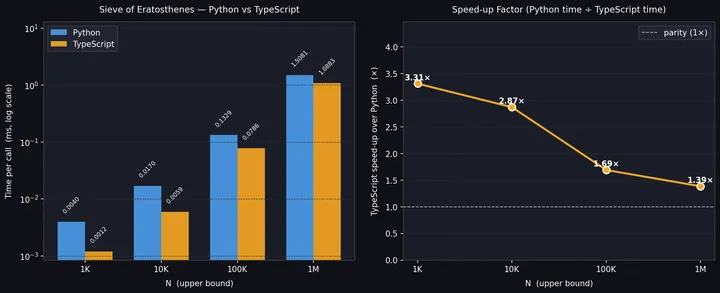
This guide walks through building a multi-language benchmarking agent with the Vercel AI SDK and Daytona sandboxes. The agent has five tools (runCode, runCommand, writeFile, readFile, downloadFile) and a concrete benchmarking task: implement the Sieve of Eratosthenes in both Python and TypeScript, time them across input sizes, render a matplotlib comparison chart, and deliver two tangible artifacts to your local disk: the chart as a PNG and the findings as a markdown report.
This is the shape of a real coding agent (multi-step, multi-language, multi-tool) producing tangible deliverables rather than just text, running entirely inside Daytona’s isolated environment.
1. Workflow Overview
Section titled “1. Workflow Overview”When you run the script, the agent receives a Sieve of Eratosthenes benchmark task, implements it in two languages, plots the result, and pulls the PNG to your local disk. The transcript below is excerpted from an actual run using claude-sonnet-4-6 against a real Daytona sandbox. Source-code arguments inside runCode and writeFile calls are abridged (marked by ...); tool-call shapes, results, file sizes, and the final answer are verbatim:
$ npm run startCreating sandbox...Prompt:Implement the Sieve of Eratosthenes (find all primes up to N) in both Python and TypeScript.Benchmark each across N = 1_000, 10_000, 100_000, and 1_000_000.
Produce two artifacts on my local disk: ./sieve_benchmark.png with a chartcomparing the languages, and ./findings.md with a markdown summary of yourfindings.
Keep your final answer concise; the full report is in the downloaded files.
Running agent...
--- Step 1: runCode ---{ "code": "# Python Sieve of Eratosthenes benchmark ...", "language": "python" }--- Step 1: result ---{"exitCode":0,"output":"N=    1,000: median=0.0040 ms\nN=   10,000: median=0.0170 ms\nN=  100,000: median=0.1329 ms\nN=1,000,000: median=1.5081 ms\n"}
--- Step 2: runCode ---{ "code": "// TypeScript Sieve of Eratosthenes benchmark ...", "language": "typescript" }--- Step 2: result ---{"exitCode":0,"output":"N=     1000: median=0.0012 ms\nN=    10000: median=0.0059 ms\nN=   100000: median=0.0786 ms\nN=  1000000: median=1.0883 ms\n"}
--- Step 3: runCode ---{ "code": "import matplotlib ... plt.savefig('/tmp/sieve_benchmark.png')", "language": "python" }--- Step 3: result ---{"exitCode":0,"output":"saved\n"}
--- Step 4: writeFile ---{ "path": "/tmp/findings.md", "content": "# Sieve of Eratosthenes - Benchmark Findings ..." }--- Step 4: result ---{"path":"/tmp/findings.md","bytes":2546}
--- Step 5: downloadFile ---                # ← parallel: chart → local disk{ "remotePath": "/tmp/sieve_benchmark.png", "localPath": "./sieve_benchmark.png" }--- Step 5: downloadFile ---                # ← parallel: findings → local disk{ "remotePath": "/tmp/findings.md", "localPath": "./findings.md" }--- Step 5: result ---{"localPath":"./sieve_benchmark.png","bytes":116848}--- Step 5: result ---{"localPath":"./findings.md","bytes":2546}
--- Step 6: text ---Both files are on your disk. Here's the concise summary:
## Results at a glance
| N         | Python (ms) | TypeScript (ms) | TS speed-up         ||----------:|------------:|----------------:|---------------------|| 1,000     |      0.0040 |          0.0012 | **3.3x**            || 10,000    |      0.0170 |          0.0059 | **2.9x**            || 100,000   |      0.1329 |          0.0786 | **1.7x**            || 1,000,000 |      1.5081 |          1.0883 | **1.4x**            |
TypeScript/V8 wins everywhere, but the advantage shrinks from ~3x to ~1.4xas N grows. At N = 1M both implementations hit the same RAM-bandwidth wall,erasing most of V8's JIT advantage. Python holds its own because the innermarking loop is replaced by a C-level bytearray slice assignment; a naiveinner loop would be 10-50x slower. Both scale as O(N log log N).(full report in ./findings.md)
Cleaning up sandbox...
After the run completes, you’ll find two real files in your project directory:
sieve_benchmark.png(~117 KB): the matplotlib chart comparing both languagesfindings.md(~2.5 KB): the structured benchmark report (methodology + raw numbers + conclusion)
The chart the agent drew on that run looks like this:
Worth noticing in the transcript:
- Each “Step N” label is one agent turn, not one tool call. Within a turn the model can emit any combination of text and tool calls. Step 6 is the only text-only turn (the final answer), so it gets a clean
--- Step 6: text ---block. The other turns each have a single tool call. - Step 5 batches parallel tool calls. Both
downloadFilecalls go out in the same turn and the Vercel AI SDK runs them concurrently, so the chart and the report ship to local disk at the same time rather than back-to-back. - Steps 1, 2, 3 all use
runCodeto execute Python, TypeScript, and Python (matplotlib) in turn. NorunCommandwas needed for the TypeScript step becauserunCodehandlests-nodeinvocation internally. The exact step count and tool mix will vary run to run; some runs may userunCommandif the agent decides topip installan extra package or inspect the filesystem before plotting.
2. Project Setup
Section titled “2. Project Setup”Clone the Repository
Section titled “Clone the Repository”Clone the Daytona repository and navigate to the example directory:
git clone https://github.com/daytonaio/daytona.gitcd daytona/guides/typescript/vercel-ai-sdk/multi-language-benchmark-agentConfigure Environment
Section titled “Configure Environment”Get your API keys:
- Daytona API key: Daytona Dashboard
- Anthropic API key: Anthropic Console
Copy .env.example to .env and add your keys:
DAYTONA_API_KEY=your_daytona_keyANTHROPIC_API_KEY=your_anthropic_keyLocal Usage
Section titled “Local Usage”Install dependencies:
npm installRun the agent:
npm run start3. How It Works
Section titled “3. How It Works”The example consists of a single Node.js script (src/index.ts) that runs on your local machine. It uses the Daytona SDK to manage a sandbox and the Vercel AI SDK’s ToolLoopAgent to drive the multi-step tool-calling loop.
Defining the Five Tools
Section titled “Defining the Five Tools”Each tool wraps a single Daytona primitive and has a single, non-overlapping job. The agent never has to choose between two paths for the same goal.
const runCode = tool({  description:    'Execute Python, JavaScript, or TypeScript source code in the sandbox. Pass standalone code; no project setup is required for any language. Use print() / console.log() to surface values. Returns the exit code and combined stdout/stderr.',  inputSchema: z.object({    code: z.string().describe('Source code to execute.'),    language: z.enum(['python', 'javascript', 'typescript']).describe('Language of the code.'),  }),  execute: async ({ code, language }) => {    const ext = { python: 'py', javascript: 'js', typescript: 'ts' }[language]    const path = `/tmp/_run_${randomUUID()}.${ext}`    await sandbox!.fs.uploadFile(Buffer.from(code, 'utf-8'), path)    const cmd = {      python: `python3 ${path}`,      javascript: `node ${path}`,      typescript:        `ts-node --transpile-only --skipProject ` +        `--compilerOptions '{"module":"commonjs","moduleResolution":"node"}' ` +        path,    }[language]    const r = await sandbox!.process.executeCommand(cmd)    return { exitCode: r.exitCode, output: r.result }  },})
const runCommand = tool({  description: 'Execute a bash shell command in the sandbox. Use for installing packages (pip, npm), running shell utilities (ls, head, wc, find), or chaining commands with pipes.',  inputSchema: z.object({    command: z.string().describe('Shell command to execute.'),  }),  execute: async ({ command }) => {    const r = await sandbox!.process.executeCommand(command)    return { exitCode: r.exitCode, output: r.result }  },})
const writeFile = tool({  description: 'Write text content to a file in the sandbox filesystem. Use for non-code artifacts: markdown reports, JSON data, config files. Overwrites any existing file at the path.',  inputSchema: z.object({    path: z.string().describe('Absolute path of the file to write.'),    content: z.string().describe('UTF-8 text content to write.'),  }),  execute: async ({ path, content }) => {    await sandbox!.fs.uploadFile(Buffer.from(content, 'utf-8'), path)    return { path, bytes: Buffer.byteLength(content, 'utf-8') }  },})
const readFile = tool({  description: 'Read a file from the sandbox filesystem and return its contents as text.',  inputSchema: z.object({    path: z.string().describe('Absolute path of the file to read.'),  }),  execute: async ({ path }) => {    const buf = await sandbox!.fs.downloadFile(path)    return { content: buf.toString('utf-8') }  },})
const downloadFile = tool({  description: 'Download a file from the sandbox to the local filesystem (where this script runs). Use this to extract generated artifacts (plots, datasets, reports) so they remain available after the sandbox is destroyed.',  inputSchema: z.object({    remotePath: z.string().describe('Absolute path of the file in the sandbox.'),    localPath: z.string().describe('Path on the local filesystem to write the downloaded bytes to.'),  }),  execute: async ({ remotePath, localPath }) => {    const buf = await sandbox!.fs.downloadFile(remotePath)    writeFileSync(localPath, buf)    return { localPath, bytes: buf.length }  },})
The tools split the agent’s surface into three clean categories:
| Category | Tools | When to use |
|---|---|---|
| Code execution | runCode | The agent wrote application code - benchmark, algorithm, plotting script. Picks Python/JavaScript/TypeScript per call. |
| Shell utilities | runCommand | Operating the sandbox itself - pip install, npm install, ls, wc. Never used to run scripts the agent wrote. |
| Filesystem | writeFile, readFile, downloadFile | Save text artifacts to the sandbox, read them back, extract any file (binary or text) to local disk. |
Defining the Agent
Section titled “Defining the Agent”The ToolLoopAgent is constructed once with the model, instructions (the agent’s persona and methodology), the tools, and a stopWhen condition. The same instance can later be invoked via .stream() (used here for live progress output) or .generate() (which waits and returns the whole result at the end):
const MODEL = anthropic('claude-sonnet-4-6')
const agent = new ToolLoopAgent({  model: MODEL,  instructions: INSTRUCTIONS,  tools: { runCode, runCommand, writeFile, readFile, downloadFile },  stopWhen: stepCountIs(25),})
const stream = await agent.stream({ prompt: BENCHMARK_PROMPT })
The benefit over inline generateText({ tools, prompt, ... }) shows up when this same agent is later exposed from an HTTP route or shared between a CLI and a UI: the configuration lives in one place, and createAgentUIStreamResponse({ agent, uiMessages }) plugs it directly into a Next.js route handler that returns a streaming Response.
Streaming the Agent’s Progress
Section titled “Streaming the Agent’s Progress”agent.stream(...) returns a result whose fullStream is an async iterable of typed events: every tool call, every tool result, every text chunk, and any errors surface as they happen. The example iterates that stream with a for await loop and a switch on part.type to print each event with a Step N label that matches what you saw in the transcript above:
let stepNum = 0
for await (const part of stream.fullStream) {  switch (part.type) {    case 'start-step':      stepNum++      break    case 'tool-call': {      const input = JSON.stringify(part.input, null, 2)      const preview = input.length > 600 ? input.slice(0, 600) + '\n... (truncated)' : input      console.log(`\n--- Step ${stepNum}: ${part.toolName} ---\n${preview}`)      break    }    case 'tool-result': {      const out = JSON.stringify(part.output)      const preview = out.length > 400 ? out.slice(0, 400) + '... (truncated)' : out      console.log(`--- Step ${stepNum}: result ---\n${preview}`)      break    }    case 'tool-error': {      const message = part.error instanceof Error ? part.error.message : JSON.stringify(part.error)      console.error(`\n--- Step ${stepNum}: ${part.toolName} ERROR ---\n${message}`)      break    }    case 'text-start':      console.log(`\n--- Step ${stepNum}: text ---`)      break    case 'text-delta':      // Text streams in token-sized chunks. Use process.stdout.write so the      // chunks concatenate on the same line as a continuous string, rather      // than each chunk landing on its own line (which is what console.log      // would do because it appends a newline).      process.stdout.write(part.text)      break    case 'text-end':      process.stdout.write('\n')      break    case 'error':      console.error(`\n--- STREAM ERROR ---\n${part.error}`)      break  }}
Each case corresponds to a distinct kind of progress event from the agent loop:
start-stepfires at the beginning of each agent turn (one round of model generation), so we use it to bump the visible step counter.tool-callandtool-resultare the model’s tool invocations and the values your tool’sexecutereturned. Each is JSON-stringified for the log; very long inputs and outputs are truncated so the console stays readable.text-start/text-delta/text-endbracket every text emission, whether it is mid-run commentary or the final answer. Thedeltaevents are token-sized chunks, which is why we write them withprocess.stdout.writeto keep them on one line.tool-erroranderrorsurface tool-execution failures and stream-level failures so a silent crash does not look like a stuck run.
Clean Up
Section titled “Clean Up”When the script exits (whether normally or on error), the Daytona sandbox is deleted in a finally block. The downloaded sieve_benchmark.png and findings.md remain on your local disk. Those are the artifacts the agent produced for you to inspect after the run.
4. Switching Providers
Section titled “4. Switching Providers”The Vercel AI SDK is provider-agnostic. To swap Anthropic for OpenAI, install @ai-sdk/openai and change two lines:
import { openai } from '@ai-sdk/openai'// ...const MODEL = openai('gpt-4o')Set OPENAI_API_KEY in .env instead of ANTHROPIC_API_KEY. The default is Anthropic Claude Sonnet 4.6, but any AI SDK provider that supports tool calling works.
Key advantages:
- Secure, isolated execution: LLM-generated code, package installs, and shell commands never touch your machine.
- Multi-language in one sandbox: the same isolated environment runs Python, Node.js, and TypeScript. Switch languages per
runCodecall. - Real artifact delivery: the agent’s output is not just text. A real PNG chart and a markdown report land on your local disk.
- Reusable agent: the
ToolLoopAgentinstance can be invoked from a CLI, a streaming chat UI, or a background job without re-defining configuration.