Scaling Tool Execution in RL Training with veRL and Daytona
This guide demonstrates how to run veRL’s ReTool recipe with Daytona sandboxes as the tool execution backend, scaling up to hundreds of tool calls per training step without hitting a concurrency ceiling.
1. Overview
Section titled “1. Overview”veRL is a distributed RL post-training framework for LLMs. The ReTool recipe trains models to solve math problems by writing and executing Python code across multi-turn interactions.
During each training step, the model generates responses and writes Python code to verify intermediate computations. veRL’s agent loop manages the sandbox lifecycle per trajectory:
create()— A sandbox is created for the trajectory (one per trajectory, reused across turns)execute()— The model’s code runs inside the sandbox and the result is returned- The model reads the result and continues generating, possibly calling the tool again
release()— The sandbox is deleted when the trajectory ends
Multiple trajectories run concurrently, each with its own isolated sandbox. The reward signal comes from final answer correctness, and the RL trainer reinforces trajectories where the model used the code interpreter effectively.
2. The Problem: Tool Execution Bottlenecks Rollout Speed
Section titled “2. The Problem: Tool Execution Bottlenecks Rollout Speed”Tool execution typically dominates multi-turn RL rollout time. VerlTool shows the effect directly: trajectory-level asynchronous execution speeds up rollout time by 1.32x on Math-TIR, 1.22x on SQL, and 1.97x on DeepSearch.
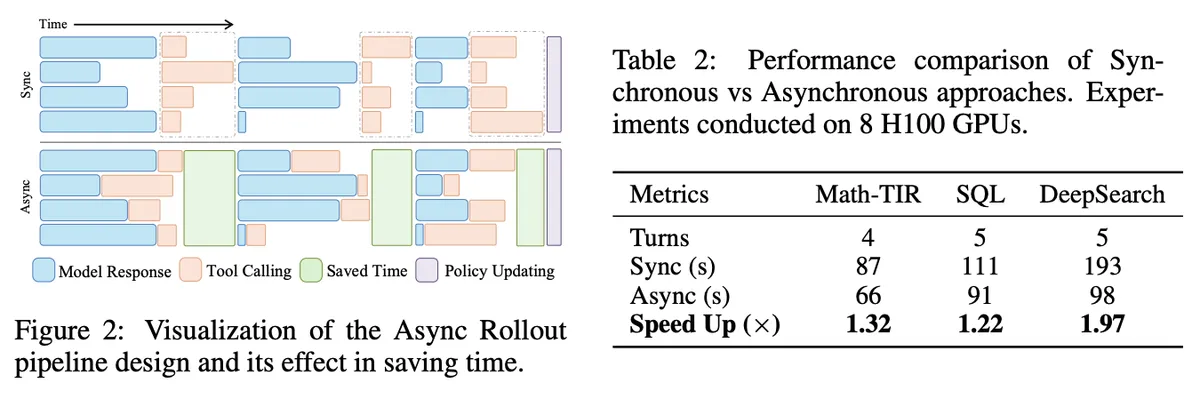
These speedups depend on the tool backend keeping pace with parallel requests. The GPU will sit idle if tool execution stalls.
3. Daytona as the ReTool Backend
Section titled “3. Daytona as the ReTool Backend”By executing tool calls on Daytona sandboxes, the async rollout pipeline can scale to hundreds of concurrent executions without saturating the backend.
- No per-instance concurrency ceiling. A single API endpoint handles hundreds of concurrent sandbox operations, removing the need to deploy multiple instances to scale.
- Fast parallel creation. Hundreds of sandboxes are created in sub-second time at rollout start and reused for all tool calls in a trajectory.
- Async SDK. The
AsyncDaytonaclient integrates directly with veRL’s async rollout workers. Workers fire requests in parallel and process results as they arrive. - Automatic cleanup. Sandboxes that fail or time out are automatically stopped and deleted, so leaked resources don’t accumulate during long training runs.
The chart below compares code execution throughput between Docker containers and Daytona sandboxes.
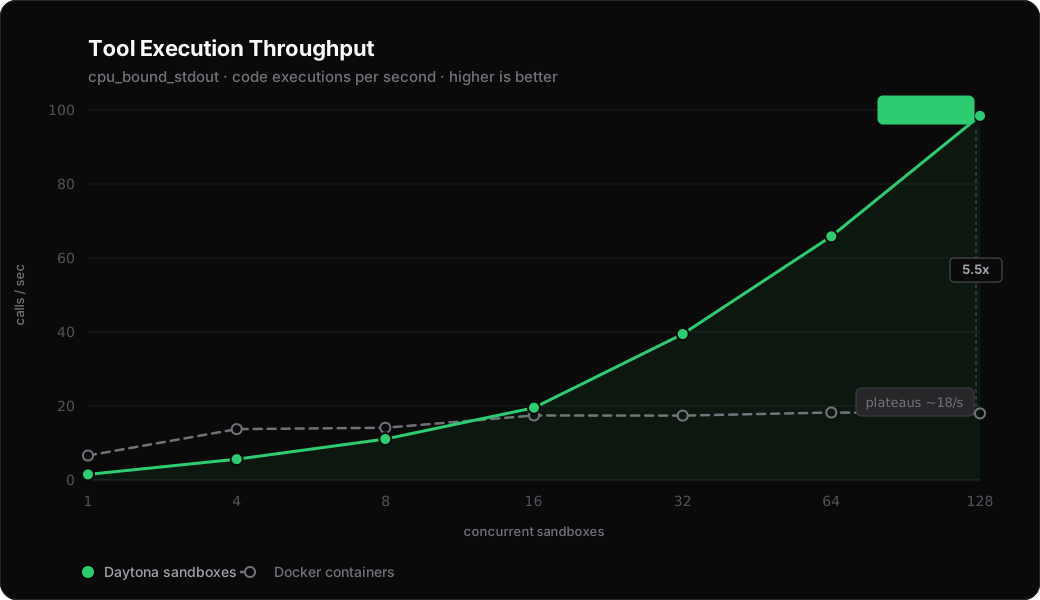
With Docker containers, throughput plateaus as concurrency increases. Container startup overhead dominates, and adding more parallelism doesn’t help. Daytona sandboxes scale linearly and reach 98 calls/sec at 128 concurrent — a 5.5x throughput improvement at peak concurrency.
4. Setup
Section titled “4. Setup”Clone veRL and Initialize the Recipe Submodule
Section titled “Clone veRL and Initialize the Recipe Submodule”git clone https://github.com/verl-project/verl.gitcd verlgit submodule update --init --recursive recipecd recipe && git pull origin main && cd ..Download the Model Checkpoint
Section titled “Download the Model Checkpoint”The ReTool recipe expects a fine-tuned SFT checkpoint. Download the pre-trained 32B checkpoint from HuggingFace:
pip install huggingface_hubhuggingface-cli download JoeYing/ReTool-Qwen-32B-SFT --local-dir checkpoint/ReTool-Qwen-32B-SFTSee the ReTool recipe README for SFT data preparation if you want to train your own checkpoint on a different model size.
Download the Datasets
Section titled “Download the Datasets”huggingface-cli download BytedTsinghua-SIA/DAPO-Math-17k --repo-type dataset --local-dir dataset/BytedTsinghua-SIA/DAPO-Math-17khuggingface-cli download yentinglin/aime_2025 --repo-type dataset --local-dir dataset/yentinglin/aime_2025huggingface-cli download Maxwell-Jia/AIME_2024 --repo-type dataset --local-dir dataset/Maxwell-Jia/AIME_2024Create an Environment and Install Dependencies
Section titled “Create an Environment and Install Dependencies”python3.10 -m venv .venvsource .venv/bin/activatepip install -e .pip install daytonaExport the Daytona API Key
Section titled “Export the Daytona API Key”Get your API key from the Daytona Dashboard and export it before running the recipe or the benchmark:
export DAYTONA_API_KEY="your_daytona_api_key"5. Start Training
Section titled “5. Start Training”Use the existing ReTool launch script and point it at the Daytona tool config and the downloaded checkpoint:
TOOL_CFG=recipe/retool/daytona_tool_config.yamlMODEL=$PWD/checkpoint/ReTool-Qwen-32B-SFT
bash recipe/retool/run_qwen2-32b_dapo.sh \  actor_rollout_ref.model.path=$MODEL \  actor_rollout_ref.rollout.multi_turn.tool_config_path=$TOOL_CFG \  trainer.project_name=retool_daytona \  trainer.experiment_name=qwen2.5-32b_dapo_daytona
The dataset, reward function, async rollout mode, and trainer setup stay the same. The only changes are the model path and tool config path.
Benchmark Script
Section titled “Benchmark Script”git clone https://github.com/daytona/guides.gitcd guides/python/reinforcement-learning/verl-retool
# Docker containers (baseline — no additional dependencies)python benchmark_tool_backends.py \ --backend docker \ --concurrency 1 4 8 16 32 64 128
# Daytona sandboxes (requires DAYTONA_API_KEY and veRL)python benchmark_tool_backends.py \ --backend daytona \ --verl-root /path/to/verl \ --concurrency 1 4 8 16 32 64 128Results are written to outputs/<backend>/<timestamp>/ as summary.json and results.csv.
Benchmarked on macOS (Docker Desktop) and Daytona cloud (includes network round-trip). Absolute numbers may vary by environment.