Build a Plan-and-Execute Data Agent With LangGraph and Daytona
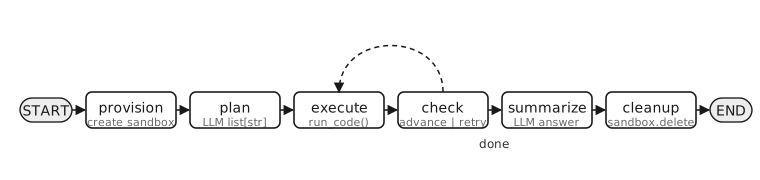
This guide demonstrates how to build a LangGraph plan-and-execute data agent that runs an end-to-end ETL plus analytical-SQL workflow inside a Daytona sandbox. The graph is hand-wired as a six-node state machine. Every node and every edge is explicit, so the agent’s control flow is fully inspectable.
In this example, we ask the agent to profile the maintenance health of the public langchain-ai/langgraph GitHub repository: extract issues and pull requests from the public GitHub REST API, transform and normalize them into a relational schema, load them into a SQLite database in the sandbox, run three analytical SQL queries, and report findings.
1. Workflow Overview
Section titled “1. Workflow Overview”You ask the agent a natural-language data question. The planner emits an ordered list of atomic plan steps as structured output. For each step the executor generates Python code and runs it in a Daytona sandbox. A deterministic check node advances to the next step on success, retries the current step (with the failing code as context, up to max_attempts) on failure, or routes to the summarizer once the plan is complete. The summarizer produces a final natural-language answer and a cleanup node deletes the sandbox.
The key benefit: every node, edge, and retry decision lives in plain Python you can read, not inside a prebuilt agent loop.
2. Project Setup
Section titled “2. Project Setup”Clone the Repository
Section titled “Clone the Repository”Clone the Daytona repository and navigate to the example directory:
git clone https://github.com/daytona/guides.gitcd guides/python/langgraph/plan-and-execute-data-agentCreate Virtual Environment
Section titled “Create Virtual Environment”python3.10 -m venv venvsource venv/bin/activate # On Windows: venv\Scripts\activateInstall Dependencies
Section titled “Install Dependencies”pip install -U langgraph langchain langchain-anthropic daytona pydantic python-dotenvThe packages include:
langgraph: Graph-structured orchestration (providesStateGraphand conditional-edge routing)langchain: Providesinit_chat_modeland, vialangchain-core, the message types (HumanMessage,SystemMessage,BaseMessage)langchain-anthropic: Integration package for the default Anthropic modeldaytona: Daytona Python SDK for sandbox provisioning and code executionpydantic: Defines the structured plan schema returned by the planner LLM callpython-dotenv: Loads environment variables from.env
To use a different LLM provider, install its integration package instead of langchain-anthropic, e.g. langchain-fireworks for Fireworks AI - see Step 7.
Configure Environment
Section titled “Configure Environment”Get your API keys and configure your environment:
- Daytona API key: Get it from Daytona Dashboard
- Anthropic API key: Get it from Anthropic Console
Create a .env file in your project:
DAYTONA_API_KEY=dtn_***ANTHROPIC_API_KEY=sk-ant-***To use a different LLM provider, set the MODEL variable and the matching provider API key instead. For example, to use Fireworks AI:
MODEL=fireworks:accounts/fireworks/models/kimi-k2p6FIREWORKS_API_KEY=fw_***3. Understanding the Core Components
Section titled “3. Understanding the Core Components”Before walking through the implementation, here are the key concepts the code relies on: the choice of agent pattern (plan-and-execute vs. ReAct), LangGraph’s StateGraph with task-specific state, how state updates flow through nodes, structured-output planning, and the Daytona code interpreter.
Plan-and-Execute vs. ReAct
Section titled “Plan-and-Execute vs. ReAct”LangGraph supports many agent topologies; plan-and-execute is one common pattern, and ReAct is its most-cited counterpoint. Understanding what plan-and-execute changes is easiest if you first know how ReAct works.
ReAct (short for Reasoning + Acting) is one of the most common patterns for structuring an agent loop. In ReAct the model alternates between two kinds of output: reasoning (free-form thinking about what to do next, sometimes visible as text, sometimes implicit in modern function-calling implementations) and action (a tool call). After each action, the tool’s result (the observation) is appended to the conversation, and the model is invoked again. The loop continues until the model emits a final natural-language answer instead of another tool call. There is no upfront plan as a separate data structure; the agent’s strategy emerges incrementally and is recorded only as the running chain of messages, tool calls, and observations in the conversation history.
Plan-and-execute splits these stages apart. The planner emits a complete plan as data (an ordered list[str] of atomic steps) before any code runs, and that plan lives in graph state where you can read it, log it, modify it, or replay individual steps. A separate execute node then implements each plan step in sequence, while a deterministic check node tracks per-step retry attempts and routes between execute and summarize. The failure-recovery loop is explicit in state rather than buried inside an agent’s internal reasoning, which makes the whole control flow auditable.
This guide implements plan-and-execute because the demo task (ETL into SQLite plus three analytical queries) has a roughly fixed shape the LLM can plan in advance.
StateGraph with custom state
Section titled “StateGraph with custom state”State is a TypedDict with task-specific fields rather than just messages. This is the canonical LangGraph pattern for non-chat workflows: state carries everything the nodes need to communicate.
class AgentState(TypedDict): sandbox: Sandbox | None user_request: str plan: list[str] step_idx: int attempts: int max_attempts: int last_error: str | None last_code: str | None step_outputs: list[str] step_codes: list[str] final_answer: strstep_codes and step_outputs are append-only lists indexed by completed plan step. The executor reads them on every call so each new step has full context about what variables and files prior steps produced.
How nodes update state
Section titled “How nodes update state”Nodes don’t mutate state in place. Each node has the signature (state: AgentState) -> dict, and the dict it returns is merged into the state by the framework. The default merge is replace-per-key: any key present in the returned dict overwrites the previous value; keys absent from the return value stay unchanged. Returning {} means the node read state without changing it.
That replace-per-key default is why the execute node’s success-path return constructs the new list explicitly:
return { "step_outputs": state["step_outputs"] + [stdout], # build new list with appended item "step_codes": state["step_codes"] + [code], ...}If we instead returned {"step_outputs": [stdout]}, the framework would replace the whole list with one element, losing prior outputs.
LangGraph also supports reducers as an alternative: annotating a state field with one (for example, Annotated[list[str], operator.add]) tells the framework to concatenate instead of replace, so a return of {"step_outputs": [stdout]} would auto-append. This guide deliberately doesn’t use reducers, so the merge logic lives where the data is constructed rather than hiding in the schema annotation.
One last detail worth knowing: when a conditional edge fires after a node, the routing function (e.g., route_from_check) sees the post-merge state. The node’s returned dict is applied to state before the router runs, so the router always reads the updated values.
Structured-output planning
Section titled “Structured-output planning”The plan node uses model.with_structured_output(Plan) where Plan is a Pydantic model with one field, steps: list[str]. The provider adapter converts this into a tool-style schema and forces the LLM to return a parseable list rather than free-form prose. This is more reliable than parsing markdown-bulleted lists by regex.
Daytona SDK
Section titled “Daytona SDK”Daytona().create() provisions a sandbox. The LLM-generated code from each execute step is run by sandbox.code_interpreter.run_code(code). We use the code_interpreter API specifically because it preserves the Python execution context across calls: imports, variables, and functions defined in one plan step are still in scope in the next.
4. Implementation
Section titled “4. Implementation”Step 1: State, schema, and prompts
Section titled “Step 1: State, schema, and prompts”from typing import TypedDictfrom pydantic import BaseModel, Fieldfrom daytona import Sandbox
class Plan(BaseModel): steps: list[str] = Field(description="Atomic plan steps the executor will implement, in order.")
class AgentState(TypedDict): sandbox: Sandbox | None user_request: str plan: list[str] step_idx: int attempts: int max_attempts: int last_error: str | None last_code: str | None step_outputs: list[str] step_codes: list[str] final_answer: strThe description argument on Field(...) in Plan is sent to the model as the schema’s natural-language hint, which steers what the LLM puts in each list entry.
The fields of AgentState group into five roles based on which nodes write to them:
- Lifecycle:
sandbox(set byprovision, nulled bycleanup),user_request(seeded at startup, immutable for the run). - Plan progress:
plan(the list of steps from the planner) andstep_idx(which step is currently being executed). - Retry tracking:
attempts,max_attempts, pluslast_errorandlast_code(written byexecuteon failure, read by the next attempt so the LLM sees the error and failing code). - Append-only history:
step_outputsandstep_codes, one entry per successfully completed step. - Output:
final_answer, populated bysummarizeonce the run finishes.
Three system prompts shape the three LLM calls that the graph makes. They are defined at module level alongside the schemas so all the static configuration lives in one place.
Planner prompt. Drives the plan node. The critical rule is preserve URLs and identifiers verbatim: without it, the planner tends to paraphrase (“fetch from the GitHub API”) and the executor then has to guess. The other rules constrain the number of steps and discourage bundling tightly-coupled work across step boundaries (which would force the executor to guess variable names from one step in the next).
PLAN_SYSTEM_PROMPT = """You are the planner stage of a plan-and-execute data agent.
Produce an ordered list of 4-8 atomic plan steps. Each step is one natural-language sentence describinga single chunk of Python code that the executor stage will then write and run in a persistent Daytona sandbox.
Rules:- Sandbox state PERSISTS across steps. Imports, variables, and files from step N are visible in step N+1.- Step 1 should establish any package installs or imports.- Each step is one coherent action. Group tightly-coupled work that shares variables (fetch + filter, or  create-schema + insert-data) into a SINGLE step so the executor doesn't have to guess prior variable names  across step boundaries. Keep loosely-coupled work in separate steps.- PRESERVE any specific URLs, endpoints, file paths, table names, or identifiers from the user's request  VERBATIM inside the plan step that uses them. Do not paraphrase URLs.- Do NOT write code in the plan. Describe what each step does."""
Executor prompt. Drives the execute node. Forces the LLM to output only Python in a fenced code block (the wrapper regex extract_code() depends on this format), to use exact URLs/paths from the user’s request, and to use the exact variable names assigned by prior steps’ code (which the prompt template injects into the user message). On a retry, the prompt also asks the LLM to diagnose and produce a materially different fix rather than retry the same approach.
EXECUTE_SYSTEM_PROMPT = """You are the executor stage of a plan-and-execute data agent.
You receive the user's original request, the full plan, and the index of the current step. You must outputONLY Python code that accomplishes the current step. The code runs in a persistent Daytona sandbox; priorsteps' variables, imports, and files are still in scope. Always `print()` the relevant output so laterstages can see the results.
Rules:- Use the EXACT URLs / endpoints / file paths from the user's original request. Do not invent or paraphrase.- CRITICAL: Before referencing any variable from a prior step, scan the prior code shown below and use  EXACTLY the variable name that the prior step assigned. Never invent variable names. If you cannot find  the variable you need in the prior code, re-derive it from scratch within your current step.- Output format: a single ```python fenced block, nothing else. No prose.- If a previous attempt failed, you will see the error and the failing code. Diagnose the root cause and  produce a materially different fix. Do not repeat the failing approach. If the error is a NameError,  the missing variable was never defined in the shown prior code; re-derive it from raw data."""
Summarizer prompt. Drives the summarize node. The whole job of this prompt is to keep the final answer honest: cite numbers that appear in the stdout, do not hallucinate values that don’t appear there, and report failures plainly if the agent gave up. This is the safety belt that prevents the LLM from fabricating plausible-looking results when the actual run was incomplete.
SUMMARIZE_SYSTEM_PROMPT = """You are the summarizer stage of a plan-and-execute data agent.
You will be shown the user's original request and the stdout from each successfully executed plan step.Produce a clear, factual answer in 1-3 short paragraphs. Cite specific numbers from the stdout. Do nothallucinate values that are not present in the stdout. If a step failed, say so plainly."""
Step 2: The provision and plan nodes
Section titled “Step 2: The provision and plan nodes”plan_llm = model.with_structured_output(Plan)
def provision(state: AgentState) -> dict: sandbox = Daytona().create() return {"sandbox": sandbox}
def plan_node(state: AgentState) -> dict: result = plan_llm.invoke([ SystemMessage(content=PLAN_SYSTEM_PROMPT), HumanMessage(content=state["user_request"]), ]) return {"plan": result.steps}Step 3: The execute node
Section titled “Step 3: The execute node”This is the node that does the real work of the agent. On every call, the executor receives the complete context of the run so far, assembled from graph state:
- the original user request (so URLs, paths, and identifiers are never lost through paraphrasing)
- the full plan with the current step marked, so the LLM sees what came before and what comes after
- every prior step’s generated code (variables, imports, helper functions that prior code defined are still in scope in the sandbox, but the LLM also needs to see them to reuse names correctly)
- every prior step’s stdout (what those steps actually printed)
- and, on retry, the previous attempt’s error and failing code
That last bullet is the key recovery mechanism. When the executor LLM has the failing code in front of it together with the traceback, it can diagnose the problem and produce a materially different fix rather than blindly retrying.
def execute(state: AgentState) -> dict:    idx = state["step_idx"]    step_text = state["plan"][idx]
    plan_listing = "\n".join(        f"  {i + 1}. {s}{' <-- CURRENT' if i == idx else ''}" for i, s in enumerate(state["plan"])    )    prompt_parts = [        f"Original user request:\n{state['user_request']}",        f"Full plan:\n{plan_listing}",        f"Current step ({idx + 1} of {len(state['plan'])}): {step_text}",    ]    if state["step_codes"]:        prompt_parts.append("Code already executed in this sandbox (variables and imports still in scope):")        for i, prior in enumerate(state["step_codes"], 1):            prompt_parts.append(f"--- step {i} code ---\n{prior}")    if state["step_outputs"]:        prompt_parts.append("Stdout from those prior steps:")        for i, output in enumerate(state["step_outputs"], 1):            prompt_parts.append(f"--- step {i} stdout ---\n{output[:1500]}")    if state["last_error"] and state["last_code"]:        prompt_parts.append(f"--- previous attempt error ---\n{state['last_error'][:1500]}")        prompt_parts.append(f"--- previous failing code ---\n{state['last_code']}")        prompt_parts.append("Diagnose and write a corrected implementation.")
    response = model.invoke([        SystemMessage(content=EXECUTE_SYSTEM_PROMPT),        HumanMessage(content="\n\n".join(prompt_parts)),    ])    content = response.content if isinstance(response.content, str) else str(response.content)    code = extract_code(content)
    sandbox = state["sandbox"]    result = sandbox.code_interpreter.run_code(code, timeout=180)    stdout = result.stdout or ""
    if result.error is not None:        err = f"{result.error.name}: {result.error.value}\n{result.error.traceback}".strip()        return {"last_error": err, "last_code": code}    return {        "last_error": None,        "last_code": code,        "step_outputs": state["step_outputs"] + [stdout],        "step_codes": state["step_codes"] + [code],    }
Note the + [stdout] and + [code] patterns in the success-path return. step_outputs and step_codes are both list[str] in the state schema; this idiom appends to those lists by constructing a new list (existing + [new_item]) rather than mutating the original in place. Returning new values is the LangGraph convention because the framework reasons about state as a sequence of immutable snapshots, which enables checkpointing, time-travel debugging, and replay.
Two more details worth calling out:
- Marking the current step with
<-- CURRENTin the plan listing nudges the LLM to focus on that step without losing sight of the surrounding ones. It can see what was already done and what remains. - Sandbox state vs. shown context are two different things. The interpreter context literally still holds whatever prior steps imported or assigned, but the LLM has no introspection into that running state. Passing prior code as text gives the LLM the symbolic view it needs to reuse names correctly.
Step 4: The check node and conditional routing
Section titled “Step 4: The check node and conditional routing”check does state mutation only. It does not decide where the graph goes. The routing decision lives in route_from_check, a function passed to add_conditional_edges.
def check(state: AgentState) -> dict:    if state["last_error"]:        return {"attempts": state["attempts"] + 1}    return {        "step_idx": state["step_idx"] + 1,        "attempts": 0,        "last_error": None,        "last_code": None,    }

def route_from_check(state: AgentState) -> str:    if state["last_error"]:        if state["attempts"] >= state["max_attempts"]:            return "summarize"        return "execute"    if state["step_idx"] >= len(state["plan"]):        return "summarize"    return "execute"
Splitting state mutation from routing keeps each function pure and the graph topology readable: check updates counters, route_from_check picks an edge.
The conditional edge itself is wired with add_conditional_edges:
graph.add_conditional_edges("check", route_from_check, {"execute": "execute", "summarize": "summarize"})This call takes three arguments: the source node ("check"), the routing function (route_from_check), and a mapping dict that translates the routing function’s return value to a destination node name. At runtime LangGraph calls route_from_check(state), gets back a string (here either "execute" or "summarize"), looks it up as a key in the mapping dict, and routes to the value (the actual node name).
In our case the dict’s keys and values are identical because the routing function happens to return literal node names. That looks redundant, but the dict layer is the convention even when they match. The reason is decoupling: a routing function can return semantic labels like "high_priority" or "needs_retry", and the dict translates those labels to whatever the graph’s actual node names are. This lets you reuse routing functions across graphs and rename nodes without touching the routing logic. You can also use the special END constant as a destination to terminate the graph from a conditional branch (for example, {"continue": "next_node", END: END}).
Step 5: summarize and cleanup
Section titled “Step 5: summarize and cleanup”def summarize(state: AgentState) -> dict: parts = [f"Original request:\n{state['user_request']}", "Outputs from executed plan steps:"] for i, output in enumerate(state["step_outputs"], 1): parts.append(f"--- step {i} stdout ---\n{output}") if state["last_error"]: parts.append(f"NOTE: the agent gave up before finishing. Last error:\n{state['last_error']}") response = model.invoke([ SystemMessage(content=SUMMARIZE_SYSTEM_PROMPT), HumanMessage(content="\n\n".join(parts)), ]) content = response.content if isinstance(response.content, str) else str(response.content) return {"final_answer": content}
def cleanup(state: AgentState) -> dict: sandbox = state.get("sandbox") if sandbox is not None: sandbox.delete() return {"sandbox": None}Step 6: Wire the graph
Section titled “Step 6: Wire the graph”graph = StateGraph(AgentState)graph.add_node("provision", provision)graph.add_node("plan", plan_node)graph.add_node("execute", execute)graph.add_node("check", check)graph.add_node("summarize", summarize)graph.add_node("cleanup", cleanup)
graph.add_edge(START, "provision")graph.add_edge("provision", "plan")graph.add_edge("plan", "execute")graph.add_edge("execute", "check")graph.add_conditional_edges("check", route_from_check, {"execute": "execute", "summarize": "summarize"})graph.add_edge("summarize", "cleanup")graph.add_edge("cleanup", END)app = graph.compile()Step 7: The main() entry point
Section titled “Step 7: The main() entry point”The main() function is the entry point that ties everything together: instantiate the chat model, build the compiled graph, seed the initial state, stream the graph to completion, and print the result. Streaming (rather than a single invoke) keeps the latest state snapshot in hand, so the finally block can defensively delete the sandbox if the run aborts before the cleanup node executes.
The model is set via the MODEL environment variable in provider:model format and defaults to Anthropic’s Claude model. Any chat model provider supported by LangChain works - install the provider’s integration package and set the MODEL variable and the provider’s API key in your .env file.
MODEL = os.environ.get("MODEL", "anthropic:claude-opus-4-6")

def main() -> None:    model = init_chat_model(MODEL, temperature=0, timeout=120, max_retries=2)    app = build_graph(model)
    initial_state: AgentState = {        "sandbox": None,        "user_request": USER_REQUEST,        "plan": [],        "step_idx": 0,        "attempts": 0,        "max_attempts": 3,        "last_error": None,        "last_code": None,        "step_outputs": [],        "step_codes": [],        "final_answer": "",    }
    # Stream the graph so we always have the latest state snapshot. If anything    # in the run raises before the `cleanup` node executes, the finally block    # will still see the live sandbox in `final_state` and delete it.    final_state: AgentState | None = None    try:        for chunk in app.stream(initial_state, config={"recursion_limit": 50}, stream_mode="values"):            final_state = chunk    finally:        if final_state is not None:            sandbox = final_state.get("sandbox")            if sandbox is not None:                try:                    sandbox.delete()                    print("\n[main] defensive cleanup: deleted orphaned sandbox")                except Exception as e:                    print(f"\n[main] defensive cleanup failed: {e}")
    print(final_state["final_answer"] if final_state else "(run did not produce a final state)")
A few things worth calling out:
initial_stateis adictwith everyAgentStatefield set to its starting value. Theprovisionnode writes the realsandboxobject; theplannode populatesplan; theexecutenode appends tostep_outputsandstep_codes;checkmutatesstep_idxandattempts. Everything starts empty/zero and is filled in by the graph.config={"recursion_limit": 50}raises LangGraph’s per-invocation super-step budget from its default of 25. A super-step is one node execution; LangGraph aborts the run withGraphRecursionErroronce that count is exceeded. For this guide the canonical plan has 6 steps (3 setup steps: install/import, fetch from GitHub, create + load SQLite; plus 3 analytical SQL queries), so a clean run uses about1 (provision) + 1 (plan) + 6 × 2 (execute → check, once per plan step) + 1 (summarize) + 1 (cleanup) = 16super-steps. Each retry adds anotherexecute → checkpair on top. The default of 25 is tight once retries fire; 50 leaves comfortable headroom.final_state["final_answer"]is the natural-language report produced by thesummarizenode. The rest offinal_statestill contains the full plan, all per-step code and outputs, the finalsandbox=None(cleanup nulled it after deletion), etc. so you can inspect or persist any of it.
5. Run the Example
Section titled “5. Run the Example”python main.pyThe agent typically emits a 6-step plan, executes each step in the persistent interpreter context, runs three analytical SQL queries, and summarizes. Because variables and imports survive across steps, an import requests in step 1 is still in scope when step 2 calls requests.get(...), so well-formed code rarely needs the retry path. The canonical run below completes all six steps on the first attempt.
Example Output
Section titled “Example Output”[provision] creating Daytona sandbox...[provision] sandbox ready (id=b9cf758d-9b93-4117-96b3-9a406c86b1b8)
[plan] asking the LLM for a multi-step plan...[plan] 6 step(s): 1. Install needed packages and import requests, sqlite3, json, datetime 2. Fetch the 100 most recently updated issues and PRs from the langchain-ai/langgraph /issues and /pulls endpoints; store the JSON responses 3. Create a SQLite database (langgraph.db) with two tables (issues, pull_requests), define schemas, and insert the fetched data 4. SQL: PR merge rate among closed PRs 5. SQL: top 5 PR authors by count with personal merge rates 6. SQL: most-commented currently-open issue
[execute] step 1/6 attempt 1/3: Install needed packages...[execute] step OK.[check] step 1 done; advancing to step 2
[execute] step 2/6 attempt 1/3: Fetch the 100 most recently updated issues and PRs...[execute] step OK. stdout:Fetched 100 issues, 100 pull requests[check] step 2 done; advancing to step 3
[execute] step 3/6 attempt 1/3: Create a SQLite database, define schemas, insert data...[execute] step OK. stdout:Created database with two tables: issues, pull_requestsInserted 40 issues (after filtering out PRs from the /issues endpoint) and 100 PRs[check] step 3 done; advancing to step 4
[execute] step 4/6 attempt 1/3: SQL: PR merge rate among closed PRs...[execute] step OK. stdout:SELECT COUNT(*), SUM(CASE WHEN merged_at IS NOT NULL THEN 1 ELSE 0 END), ROUND(100.0 * SUM(CASE WHEN merged_at IS NOT NULL THEN 1 ELSE 0 END) / COUNT(*), 2)FROM pull_requests WHERE state = 'closed'=> 100 closed, 96 merged, 96.0% merge rate[check] step 4 done; advancing to step 5
... (steps 5-6 succeed) ...
[summarize] asking the LLM for a final answer...[cleanup] deleting sandbox ...[cleanup] done
============================================================FINAL ANSWER============================================================PR Merge Rate: 96/100 closed PRs merged = 96.0%.
Top 5 PR authors (total PRs, personal merge rate): nfcampos 40 100.00% hinthornw 18 100.00% hwchase17 15 93.33% rlancemartin 10 100.00% baskaryan 4 100.00%
Most-commented open issue: "Long tool calls (~180s+) silently re-executed from checkpoint on LangGraph Cloud" 25 comments, opened by MarioAlessandroNapoli on 2026-04-05.What the retry path catches
Section titled “What the retry path catches”In the canonical run above no step needs a retry, because the interpreter context’s persistent state matches what the LLM expects: variables and imports from earlier steps are still live, so the obvious “I forgot to re-import” class of failure cannot happen. The retry path is still there, and it fires for genuine code failures: a syntax error, a runtime exception (KeyError, TypeError, IndexError), the LLM hallucinating a method that doesn’t exist on the response object, a malformed SQL query, an unhandled empty result, and so on.
When a step does fail, sandbox.code_interpreter.run_code(code) returns an ExecutionResult whose error field is set to an ExecutionError carrying name, value, and traceback. The execute node serializes those fields into state["last_error"] and stores the failing source in state["last_code"]. check sees the error, increments attempts, and route_from_check sends control back to execute. The retry call to the LLM now includes both the original step description, the still-in-scope prior steps’ code, and the failing code plus the error and traceback, so the LLM can diagnose the problem and produce a materially different fix rather than retrying the same approach. This continues up to max_attempts times; past that, route_from_check routes to summarize with state["last_error"] still set, and the summarizer reports the failure honestly instead of fabricating a result.
This is the value the graph provides: the failure state is explicit, persistent, and visible to every subsequent LLM call. There’s no hidden conversation context, no implicit ReAct loop, no need to trust the prebuilt agent. Every routing decision happens in code you can read.
6. Adapting the Example
Section titled “6. Adapting the Example”The graph topology is task-agnostic. To profile a different repository, change the URL in USER_REQUEST and rerun. To use a different model, set the MODEL environment variable in provider:model format (e.g. fireworks:accounts/fireworks/models/kimi-k2p6) and set the matching provider API key. To allow more retries per step, raise max_attempts in the initial state dict. To run a different analytical workflow entirely, replace USER_REQUEST; the plan-and-execute machinery doesn’t care what task it’s executing.
Key advantages of this approach:
- Inspectable plan: The list of steps lives in graph state as data (
state["plan"]), not implicit in chat history, so you can log it, modify it, or replay any individual step. - Explicit retry control: Failure handling is your code, not a prebuilt agent’s black box.
max_attempts, the routing logic inroute_from_check, and the prompt context shown on each retry are all readable and tunable. - Persistent interpreter context: Daytona’s
code_interpreter.run_codeshares one Python interpreter across allexecutecalls, so imports, variables, and functions defined in earlier steps stay in scope, exactly the behavior the LLM’s plan assumes. - Secure sandbox execution: Every line of LLM-generated Python runs in an isolated Daytona sandbox, not on your machine.
- Task-agnostic topology: The same six-node graph works for any analytical workflow by swapping
USER_REQUEST. The provision/plan/execute/check/summarize/cleanup machinery doesn’t depend on the specific task.