Run Pi with the Daytona Extension
This guide demonstrates how to run the Daytona Pi extension which integrates Daytona sandboxes and Pi. When the extension is active, the agent runs on your machine while every tool call — bash, file I/O, and search — runs inside a secure Daytona sandbox. Each session gets its own sandbox, and your work is synced to a per-session GitHub branch.
1. Workflow Overview
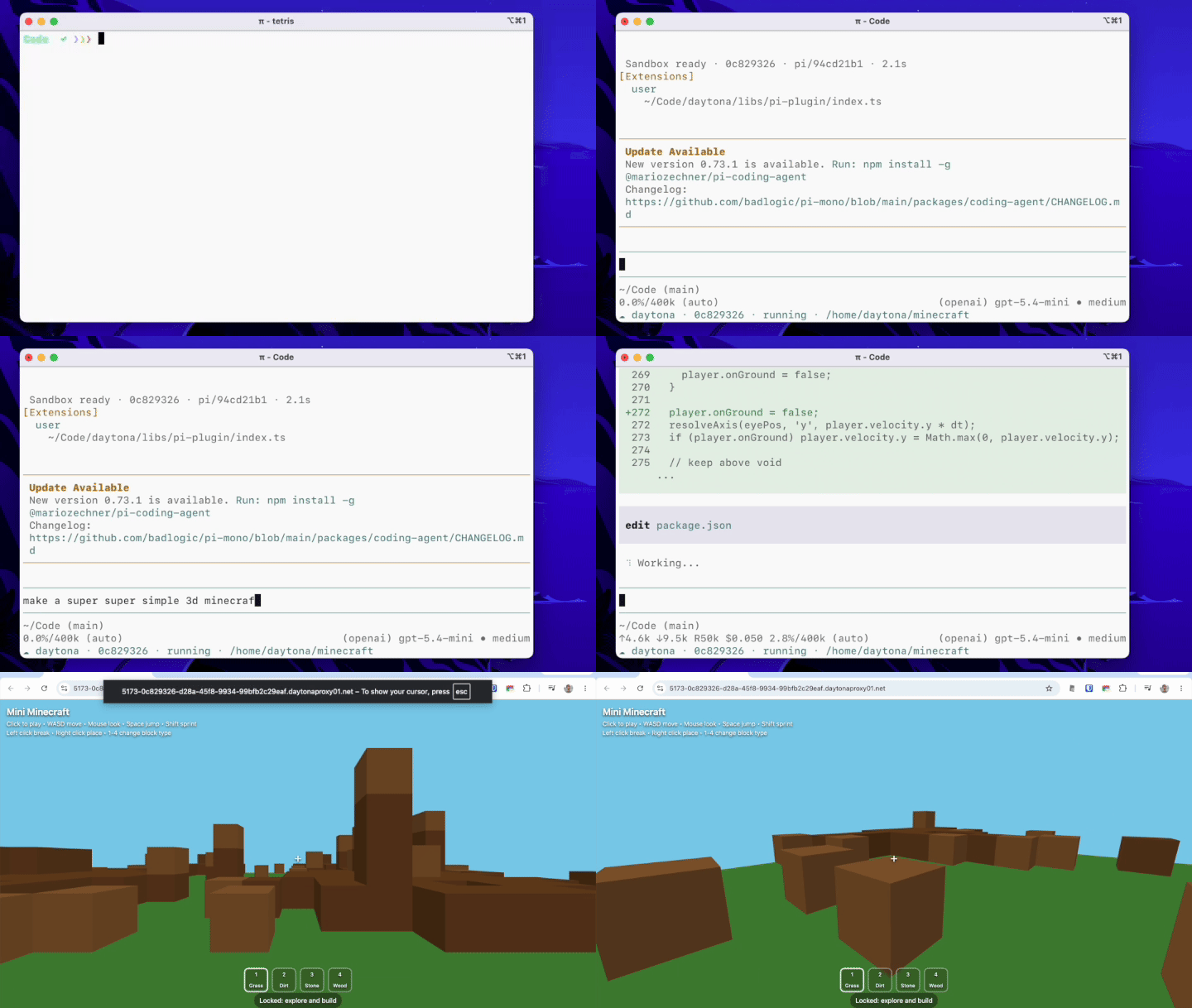
Section titled “1. Workflow Overview”When you launch Pi with --daytona, a sandbox is created for the session and the repo you launched Pi in is cloned into it. From then on, every tool call — running code, installing dependencies, starting servers — happens in the sandbox rather than on your host.
2. Setup
Section titled “2. Setup”Install Pi
Section titled “Install Pi”Install Pi globally with npm:
npm install -g @earendil-works/pi-coding-agentSee the Pi documentation for other install options.
Add the Extension
Section titled “Add the Extension”Add the Daytona extension to Pi:
pi install npm:@daytona/piTo update it later, run pi update — pi install will not refresh an existing install.
Configure Environment
Section titled “Configure Environment”This extension requires a Daytona account and Daytona API key to create sandboxes.
export DAYTONA_API_KEY="your-api-key"If no key is set, Pi prompts you for one once per session. To enable GitHub branch sync, also authenticate the GitHub CLI (gh auth login).
Run Pi
Section titled “Run Pi”Run Pi from inside a git repository:
cd my-projectpi --daytonaThe repo you’re in is cloned into the sandbox and your work is synced to a GitHub branch. Point at a different repository with --repo, or run outside a git repo for a blank workspace.
| Flag | Description |
|---|---|
--daytona | Run tools inside a Daytona sandbox |
--repo <url> | Git repo to clone (defaults to the repo you’re in) |
--branch <name> | Branch to clone (defaults to your current branch) |
--snapshot <name> | Choose a Daytona snapshot / base image |
--public | Create a public sandbox so preview URLs need no token |
--idle-stop <min> | Minutes idle before the sandbox pauses (default 15) |
Slash commands
Section titled “Slash commands”While Pi is running with --daytona, you can manage the active sandbox:
/sandbox— show the active sandbox’s status: state, working directory, branch, sync status, and its GitHub branch link/github— open this session’s branch on GitHub/compare— open this session’s branch compare view on GitHub/merge— merge this session’s branch into its base on GitHub/pr— open a GitHub pull request for this session’s branch
3. Understanding the Extension Architecture
Section titled “3. Understanding the Extension Architecture”The extension is a single Pi extension that splits work between your machine and the sandbox:
| On your machine (host) | In the sandbox (Linux) | |
|---|---|---|
| Agent & tools | The agent (LLM, TUI, sessions) | File operations and commands (bash, read, write, edit, ls, find, grep) |
| Git & GitHub | GitHub authorization with gh, and /merge via the GitHub API | Git operations (clone and push) via the Daytona git API |
A session flows through it like this:
- Tool registration — at startup, Pi’s built-in tools are replaced with sandbox-backed versions, so every tool call runs in the sandbox.
- Session start — a sandbox is created for the session, or reattached when you resume it, and the repo is cloned in.
- System prompt — before the agent starts, the system prompt is pointed at the sandbox.
- GitHub branch sync — after each turn, the agent’s commits are pushed to its branch.
- Reconciliation — after you delete a session, its orphaned sandbox is eventually reconciled and removed.
1. Tool registration
Section titled “1. Tool registration”Each built-in tool is re-registered so that, when a sandbox is active, it runs against it through the Daytona SDK. A small sandboxTool helper wraps a local tool with a per-call rebuild against the active sandbox:
// Wrap a local tool so it runs against the sandbox (rebuilt per call) when one is active.function sandboxTool(local, makeRemote) {  return {    ...local,    execute: (...args) => {      const active = requireSandbox(); // throws when --daytona is set but no sandbox; null when off      const tool = active ? makeRemote(active.cwd, active.sandbox) : local;      return tool.execute(...args);    },  };}
pi.registerTool(sandboxTool(localBash, (cwd, sb) => createBashTool(cwd, { operations: createBashOps(sb) })));read, write, edit, and ls are registered the same way with their own factories; find and grep run a dedicated search inside the sandbox.
2. Session start
Section titled “2. Session start”On session_start the extension reattaches the sandbox it created earlier for this session — so resuming restores your work — or creates a new one:
pi.on("session_start", async (event, ctx) => { const prev = lastSandboxFor(ctx); // recorded in a session entry on first run active = prev ? await daytona.get(prev.sandboxId) // resume → reattach : await daytona.create({ labels: { "created-by": "pi-daytona", "session-id": sessionId }, }); // new → create});With a GitHub repo, a new sandbox also gets the pi/<id> branch created and cloned into it.
3. System prompt
Section titled “3. System prompt”A before_agent_start hook rewrites the agent’s working-directory line to the sandbox path and tells it to commit (but not push) its work:
pi.on("before_agent_start", (event) => { if (!active) return; const cwdLine = `Current working directory: ${active.cwd} (Daytona sandbox ${shortId(active.sandbox.id)})`; let systemPrompt = event.systemPrompt.replace(/Current working directory: .*/g, cwdLine); systemPrompt += "\n\nThis project is a git repository inside a Daytona sandbox. After you finish a unit of work, " + 'commit it with git. Do not push — pushing is handled automatically.'; return { systemPrompt };});4. GitHub branch sync
Section titled “4. GitHub branch sync”When you’re in a github.com repo and authenticated with gh, each session gets its own branch. The host only uses gh to mint a token and call the GitHub REST API (to create the branch and merge it); all git transfer — clone, commit, push — runs inside the sandbox via the Daytona git API.
The agent commits its own work; after each turn the extension pushes any new commits to the branch:
pi.on("agent_end", async () => { if (!active?.git) return; const token = await getGithubToken(pi); const status = await active.sandbox.git.status(active.cwd); if ((status.ahead ?? 0) > 0) { await active.sandbox.git.push(active.cwd, "x-access-token", token); }});When you’re not in a github.com repo (or gh isn’t authenticated), push is disabled — the sandbox still keeps a local git repo so the agent can commit, but nothing is pushed.
5. Reconciliation
Section titled “5. Reconciliation”Pi has no “session deleted” event, so the extension reconciles: on session_start and session_shutdown it reaps any sandbox whose session no longer exists by comparing Daytona’s labelled sandboxes against Pi’s live sessions.
async function reapOrphans(daytona) { const live = new Set((await SessionManager.listAll()).map((s) => s.id)); for await (const sandbox of daytona.list({ labels: { "created-by": "pi-daytona" } })) { const sessionId = sandbox.labels?.["session-id"]; if (sessionId && !live.has(sessionId)) await sandbox.delete(); }}So deleting a session from Pi’s resume menu cleans up its sandbox on the next launch or exit.
Key advantages:
- Secure, isolated execution: every Pi tool call runs in a Daytona sandbox, and never on your host when
--daytonais set - One sandbox per session, reattached on resume and deleted only when you delete the session
- Optional GitHub branch sync: each session gets a
pi/<id>branch you can review and merge - Live preview links when a server starts in the sandbox
- The agent’s brain stays on your machine — only tool execution is remote