Build an AI App Builder with Convex and Daytona
This guide demonstrates how to build an AI app builder on Convex using the @daytona/convex component. A user describes an app in one prompt; an LLM writes the code, a Daytona sandbox installs and serves it, and the running app appears in the page as a live iframe — with every build step streamed to the browser as it happens.
The interesting part is what you don’t write: there is no polling, no WebSocket plumbing, and no job-status endpoint. Each pipeline step is a plain document patch in Convex, and the UI subscribes with useQuery — so the build timeline animates live, survives a page refresh mid-build, and stays consistent across every open client.
1. Workflow Overview
Section titled “1. Workflow Overview”One Convex action drives the whole pipeline. Each step updates the app’s row in the database, and the UI re-renders on every patch:
Browser (React + useQuery — live) │ "build me a habit tracker" ▼Convex action (builder.build) ├─ creates a Daytona sandbox ──▶ status: "creating sandbox" ├─ LLM generates src/App.jsx ──▶ status: "generating code" ├─ writes Vite scaffold + generated app ──▶ status: "writing files" ├─ npm install inside the sandbox ──▶ status: "installing dependencies" ├─ starts the dev server (backgrounded) ──▶ status: "starting dev server" └─ signed preview URL ──▶ status: "ready" → iframe renders itFollow-up prompts (“make it dark mode”) regenerate the app file and write it into the sandbox. Vite’s file watcher picks the change up and hot-reloads the iframe — a chat back-and-forth becomes a live editing loop on the running app.
2. Project Setup
Section titled “2. Project Setup”Clone the Repository
Section titled “Clone the Repository”Clone the Daytona guides repository and navigate to the example directory:
git clone https://github.com/daytona/guides.gitcd guides/typescript/convex/ai-app-buildernpm installCreate a Convex Deployment
Section titled “Create a Convex Deployment”The example runs on a free anonymous local deployment — no Convex account required:
npx convex dev --onceConfigure API Keys
Section titled “Configure API Keys”Get your keys:
- Daytona API key, from the Daytona Dashboard
- OpenAI API key, from platform.openai.com
Set them on the Convex deployment. They are read by Convex actions on the server — the browser never sees them:
npx convex env set DAYTONA_API_KEY your_daytona_keynpx convex env set OPENAI_API_KEY your_openai_key3. Understanding the Core Components
Section titled “3. Understanding the Core Components”The Daytona Component
Section titled “The Daytona Component”Convex components are isolated backend modules you install into your app. convex/convex.config.ts is all it takes:
import daytona from '@daytona/convex/convex.config.js'import { defineApp } from 'convex/server'
const app = defineApp()app.use(daytona)
export default app
The component keeps its own tables (sandboxes, execution history) in an isolated namespace and exposes a typed client:
import { Daytona } from '@daytona/convex'import { components } from './_generated/api'
const daytona = new Daytona(components.daytona)
The Apps Table
Section titled “The Apps Table”Each generated app is one row. The status field is the reactive backbone of the entire UI:
apps: defineTable({ prompt: v.string(), status: v.union( v.literal('creating sandbox'), v.literal('generating code'), v.literal('writing files'), v.literal('installing dependencies'), v.literal('starting dev server'), v.literal('ready'), v.literal('error'), ), sandboxId: v.optional(v.string()), previewUrl: v.optional(v.string()), code: v.optional(v.string()), draftCode: v.optional(v.string()), error: v.optional(v.string()),})The Fixed Scaffold
Section titled “The Fixed Scaffold”The LLM only ever generates one file: src/App.jsx. Everything else — package.json, vite.config.js, index.html, src/main.jsx — is a fixed scaffold written from constants (convex/scaffold.ts). This keeps generations fast, cheap, and reliable, and it means every generated app gets the same known-good Vite setup. One scaffold detail matters for Daytona:
// vite.config.js written into every sandboxserver: { host: true, // listen on all interfaces, not just localhost port: 3000, strictPort: true, allowedHosts: true,}allowedHosts deserves a note, because it looks like CORS and isn’t. Daytona’s preview proxy relays every request to the dev server inside the sandbox, but it forwards the public preview domain (e.g. 3000-abc123.daytonaproxy01.eu) as the request’s Host header. Vite validates that header against an allowlist — by default localhost only — as protection against DNS-rebinding attacks, and answers 403 Blocked request for unknown hosts. Allowing all hosts is fine here: the server runs inside an isolated sandbox and is only reachable through the preview URL anyway.
4. Implementation
Section titled “4. Implementation”The pipeline lives in convex/builder.ts. The pieces worth understanding:
Parallelizing Sandbox Creation and Code Generation
Section titled “Parallelizing Sandbox Creation and Code Generation”Sandbox provisioning and LLM generation are independent, so the action runs them concurrently and reports the slower path’s progress:
const abort = new AbortController()const sandboxPromise = daytona .createSandbox(ctx, { labels: { 'created-by': 'convex-ai-app-builder' }, autoStopInterval: 15, // pause after 15 idle minutes autoDeleteInterval: 120, // self-clean after 2 hours }) .catch((error) => { abort.abort() // sandbox failed — stop paying for tokens throw error })await setStatus(ctx, appId, { status: 'generating code' })const [{ sandboxId }, code] = await Promise.all([ sandboxPromise, generateAppCode(ctx, appId, args.prompt, abort.signal),])The AbortController handles the unhappy path of parallelism: if sandbox creation rejects, the LLM stream is aborted rather than left generating code for an app that’s already failed.
Streaming the Code as It’s Written
Section titled “Streaming the Code as It’s Written”generateAppCode uses the Vercel AI SDK’s streamText — and here Convex turns token streaming into something better than the usual SSE-to-one-tab setup. As chunks arrive, the action patches the accumulated partial code into the app’s draftCode field (throttled to ~3 writes per second):
const result = streamText({ model: openai('gpt-5.4'), system: SYSTEM_PROMPT, prompt, abortSignal })
let draft = ''let lastPatch = 0for await (const chunk of result.textStream) {  draft += chunk  if (Date.now() - lastPatch > 300) {    lastPatch = Date.now()    await ctx.runMutation(internal.apps.update, { appId, draftCode: draft })  }}const text = await result.text
Because each patch is just reactive state, the code visibly writes itself in every open client — and unlike a socket-based stream, it’s durable: refresh mid-generation and the stream picks up right where it is. The UI renders draftCode in a monospace panel pinned to the newest lines while the status is generating code, and the field is cleared once the final file is written.
What You Didn’t Have to Build
Section titled “What You Didn’t Have to Build”It’s worth pausing on what this feature costs in a conventional stack. Streaming-UI frameworks and streamText-over-HTTP give you a pipe from one server request to one browser tab — the stream is the connection. Everything beyond that single tab is yours to build:
| Behavior in this example | The connection-based equivalent |
|---|---|
| Code streams into the UI | SSE/WebSocket endpoint, client reconnect + backoff logic |
| Refresh mid-generation, stream resumes | Persist chunks server-side, add a hydration path, dedupe on reconnect |
| Second tab — even one opened mid-generation — shows the identical stream | Fan-out layer (Redis pub/sub or similar) between server and sockets, plus replay of already-sent chunks for late joiners |
| Build steps and code stream never contradict each other | Ordering guarantees between two event channels |
| Yesterday’s builds still there, with full history | A database — at which point you’re syncing the database and the stream |
Here the entire feature is the ~15 lines above: the action patches a document, and useQuery subscribers converge on it. There is no second channel to keep consistent with the database, because the database is the channel — the same transactional state that drives the build timeline drives the token stream. That collapse — stream, storage, and fan-out into one consistent primitive — is the concrete reason to put an app builder’s backend on Convex rather than wiring it around a request/response framework.
Writing Files into the Sandbox
Section titled “Writing Files into the Sandbox”The scaffold and the generated component are written with the component’s filesystem API:
for (const [path, content] of Object.entries(SCAFFOLD_FILES)) { await daytona.writeFile(ctx, { sandboxId, path: `${APP_DIR}/${path}`, content })}await daytona.writeFile(ctx, { sandboxId, path: `${APP_DIR}/src/App.jsx`, content: code,})Installing and Starting the Dev Server
Section titled “Installing and Starting the Dev Server”daytona.run executes commands synchronously and records each execution in the component’s history table. Installing is a plain call:
const install = await daytona.run(ctx, { sandboxId, command: 'npm install --no-audit --no-fund', cwd: APP_DIR, timeoutSeconds: 300,})if (install.exitCode !== 0) { throw new Error(`npm install failed: ${install.result.slice(-500)}`)}The dev server is different: it must outlive the action. Background it with its output redirected, then poll until it accepts connections:
await daytona.run(ctx, { sandboxId, command: `nohup npm run dev > /tmp/dev.log 2>&1 &`, cwd: APP_DIR,})const wait = await daytona.run(ctx, { sandboxId, command: `for i in $(seq 1 60); do curl -sf -o /dev/null http://localhost:3000 && exit 0; sleep 1; done; cat /tmp/dev.log; exit 1`, timeoutSeconds: 90,})if (wait.exitCode !== 0) { throw new Error(`dev server failed to start: ${wait.result.slice(-500)}`)}The output redirection is load-bearing, and the reason is subtle. Daytona’s execute captures a command’s stdout/stderr through pipes and resolves only when those pipes close. With a bare npm run dev &, the shell exits immediately — but the backgrounded dev server inherits the shell’s stdout/stderr pipes and holds them open for as long as it runs, so the daytona.run call would hang until its timeout even though the foreground command finished long ago. Redirecting the server’s output into /tmp/dev.log points those descriptors at a file instead, the pipes close the moment the shell exits, and the call returns instantly — with a log file left behind to surface if startup fails.
The Preview URL
Section titled “The Preview URL”The final step asks Daytona for a signed preview URL to port 3000 — a link anyone (including an <iframe>) can open without an API key, valid for 24 hours:
const preview = await daytona.getPreviewUrl(ctx, { sandboxId, port: 3000, expiresInSeconds: 60 * 60 * 24,})await setStatus(ctx, appId, { previewUrl: preview.url, status: 'ready' })Iteration = Rewrite One File
Section titled “Iteration = Rewrite One File”The iterate action sends the current App.jsx plus the user’s instruction back to the LLM and writes the result over the old file. The dev server is never restarted — Vite’s watcher sees the change and hot-reloads the iframe within a second:
// Atomic claim: checks the app is ready and flips it to "generating code" in// ONE transaction — two concurrent follow-ups can't both pass, so edits never// silently overwrite each other. This is Convex's serializable mutations at work.const app = await ctx.runMutation(internal.apps.beginIterate, { appId: args.appId })
// Confirm the sandbox is alive BEFORE spending tokens: it pauses after 15// idle minutes (restarted here, a no-op when already running) and// auto-deletes after 2 hours (fails fast instead of wasting a generation).await daytona.startSandbox(ctx, { sandboxId: app.sandboxId! })
const code = await generateAppCode(  ctx,  args.appId,  `Here is the current src/App.jsx:\n\n${app.code}\n\nApply this change and output the complete updated file:\n${args.instruction}`,)await daytona.writeFile(ctx, { sandboxId: app.sandboxId!, path: `${APP_DIR}/src/App.jsx`, content: code })
Note the first line: because Convex mutations are serializable transactions, “check the status and claim the app” is one atomic step — the concurrency control that would need row locks or version columns elsewhere is a four-line mutation here.
The Reactive Frontend
Section titled “The Reactive Frontend”The entire live-updating UI is one hook — no subscriptions to manage, no cache to invalidate:
const apps = useQuery(api.apps.list) ?? []Every setStatus patch the pipeline makes re-renders this list. The build timeline, the status badges, and the moment the iframe appears are all consequences of that single line.
5. Run the Example
Section titled “5. Run the Example”npm run devOpen http://localhost:5173 and type a prompt — “a kanban board with three columns”, “a pomodoro timer with a circular progress ring”. Watch the timeline advance until the app appears, then ask for a change and watch the iframe hot-reload.
Example Output
Section titled “Example Output”For the prompt:
a retro drum machine with a 16-step sequencer grid for kick, snare, hi-hat and clap, play/stop, and a tempo slider
the build timeline runs through its steps and the finished app appears in the card’s iframe — a working WebAudio drum machine with a programmable step grid, generated, installed, and served in about a minute:
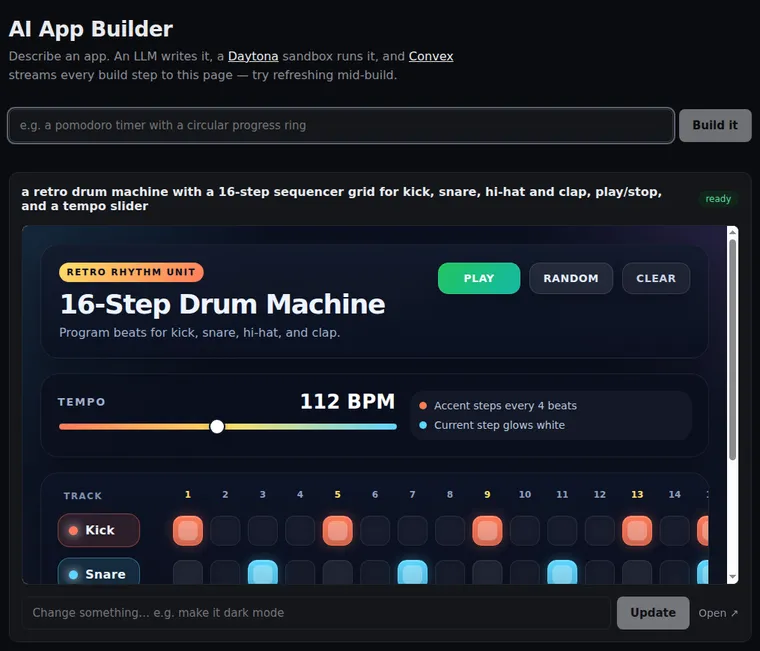
Ask for a change — “make the pads neon pink” — and the iframe hot-reloads with the edit.
Two things worth trying, because they show what Convex is contributing:
- Refresh the page mid-build. The timeline resumes exactly where it is — the build state lives in the database, not the connection.
- Open the page in a second tab. Both tabs track every build in real time.
6. Adapting the Example
Section titled “6. Adapting the Example”Add users. The component was designed for multi-tenancy: authenticate callers in your Convex functions and pass a userKey to createSandbox, then scope queries with daytona.listSandboxes(ctx, { userKey }) — each user sees only their own apps.
Change the base environment. Sandboxes here use Daytona’s default snapshot (Node.js preinstalled). Pass image: 'python:3.12'-style options to createSandbox for other stacks, or a prebuilt snapshot with dependencies baked in to cut npm install out of the pipeline entirely.
Let your agent drive it. This example calls the LLM once per build; a real coding agent decides for itself when to write files, run commands, or check output. The bridge is tool definitions: with Convex’s agent component you define AI SDK tools whose handlers receive the Convex context — so a runCommand tool’s handler is just daytona.run(ctx, …), a writeFile tool wraps daytona.writeFile(ctx, …), and so on. The agent component manages the conversation loop and durable threads; the Daytona component supplies the hands. Everything in this guide’s pipeline then becomes something the model can invoke on its own.
Mind the limits. Convex actions time out after 10 minutes (platform limit); the component is designed around it — synchronous commands are bounded at 540 seconds by default, stored output is truncated at 64 KB, and up to 4 MB is returned per call. For longer jobs, use the component’s runBackground: it starts the command in a sandbox session and returns immediately, while a scheduler-driven poller streams logs into the execution row and records the exit code when it finishes — no action is held open and no duration bound applies. Since a running background command doesn’t reset the sandbox’s idle timer, create long-job sandboxes with autoStopInterval: 0.
7. Key Advantages
Section titled “7. Key Advantages”- The database is the stream. Build steps and LLM tokens are document patches, not socket events — one consistent primitive replaces SSE endpoints, reconnect logic, fan-out infrastructure, and the bugs between them.
- Durable by default. Refresh mid-build and the timeline resumes; reopen tomorrow and every app, prompt, and build is still there. Nothing lives in a connection.
- Every client sees the same truth. A second tab, a teammate’s browser, an admin dashboard — all converge on identical state with no extra code.
- All generated code runs in an isolated Daytona sandbox, never in your backend or on the user’s machine — with real preview URLs instead of screenshots or approximations.
- Follow-up edits hot-reload the running app —
writeFileplus Vite’s watcher turns iteration into a sub-second loop. - Sandboxes clean up after themselves via auto-stop and auto-delete intervals, so cost tracks actual use.