Run Gemini Managed Agents on Daytona
A guide to running the tool calls of Gemini Managed Agents in your own Daytona sandboxes, with a self-hosted environment.
Introduction
Section titled “Introduction”Gemini Managed Agents, such as the Antigravity agent, run through the Gemini Interactions API. You send a task, and the agent plans, runs shell commands, reads and writes files, and reports back. Google runs the agent loop and the model. By default, the agent’s tools run in a Google-managed sandbox.
A self-hosted environment moves tool execution to you. The agent loop, model calls, and interaction stream stay on Google’s side; the shell commands and file operations run in a worker you operate. The worker is the environment runtime built into Google’s gemini-api CLI. With the Daytona integration, that worker runs in a Daytona sandbox.
How the pieces fit together
Section titled “How the pieces fit together”Three parties are involved in every interaction:
- Google runs the Gemini API, the agent loop, and the model. It also hosts your self-hosted environment: an id, an environment key, and a queue of interactions waiting for a worker. The environment has no compute of its own; your Daytona sandboxes do the work.
- You run an application that creates interactions in that environment, and the worker side: either one long-running worker, or a poller that starts a worker for each interaction.
- Daytona provides the sandboxes in which the worker runs the agent’s tools.
When the agent calls a tool, Google sends the call to the worker that holds the interaction’s lease. The worker runs it inside the sandbox and streams the result back. The self-hosted runtime provides these tools:
execute_bashruns a shell command in the worker’s working directory.view_file,list_dir,grep_search, andfind_by_nameread and search files.write_to_fileandreplace_file_contentcreate and edit files.
The file tools are confined to the worker’s --root-dir. execute_bash runs model-generated commands without that confinement, which is why the worker belongs in a sandbox rather than on your own machine.
Two ways to run the worker
Section titled “Two ways to run the worker”The runtime can run workers in two ways, and the reference implementation supports both. Use one of them per environment: if both run against the same environment, they compete for its interactions.
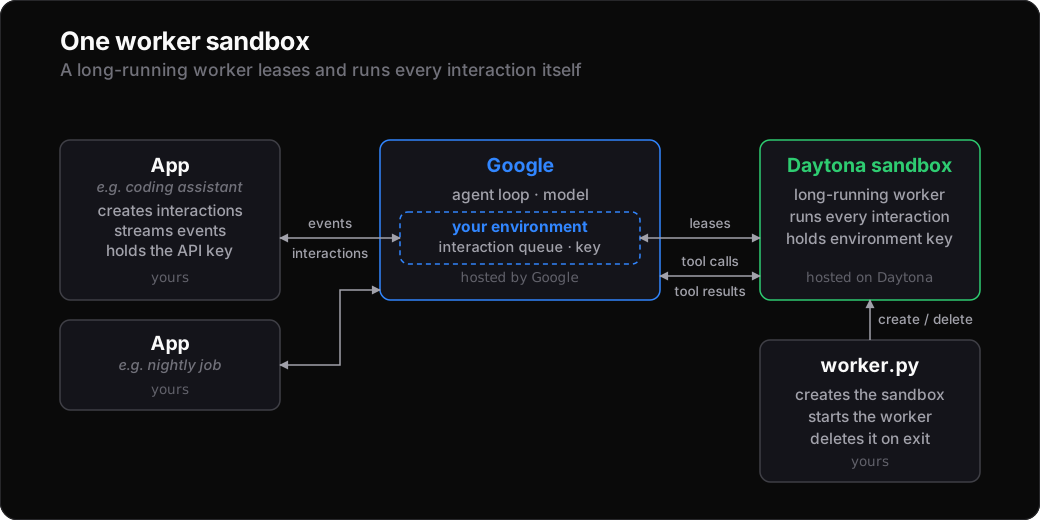
One worker sandbox. gemini-api environments connect runs in a long-lived sandbox. It holds the environment key, leases the environment’s interactions itself, and runs all of them, with no poller. Files persist between interactions for as long as the sandbox runs.
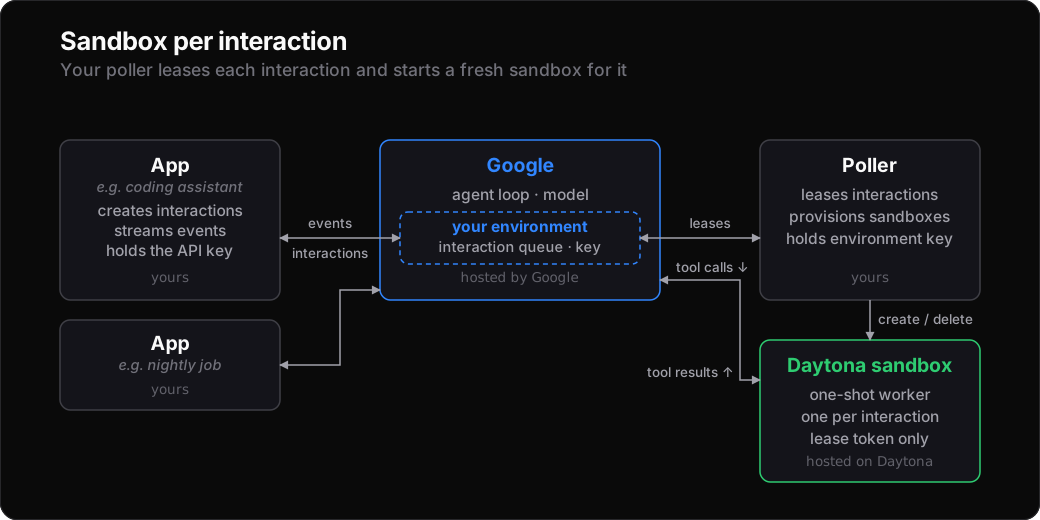
A sandbox per interaction. gemini-api environments poll runs on your host with the environment key. For each interaction it leases, it runs a provisioning command that creates a fresh Daytona sandbox running gemini-api environments serve with only that interaction’s short-lived lease token. The sandbox is deleted when the interaction ends, so every interaction starts in a clean sandbox.
Which one to use:
- One worker sandbox suits a single user or a development loop. The worker is already running when an interaction arrives, and follow-up interactions find the files earlier ones left behind. Only
worker.pyruns on your side, but the environment key lives in the sandbox, where the agent’s commands run. - A sandbox per interaction suits production, multiple users, and untrusted input. Each interaction gets its own sandbox, which holds no long-lived credential and exists only while the interaction runs. It needs the poller running on a host you operate, and adds a few seconds of sandbox start-up to each interaction.
What you set up
Section titled “What you set up”Reference implementation
Section titled “Reference implementation”A reference implementation of the environment setup, the worker snapshot, both worker modes, and an example application is in the Daytona guides repo at python/gemini/gemini-managed-agents/. Each section below names the file it uses.
To follow along locally:
git clone https://github.com/daytona/guides.gitcd guides/python/gemini/gemini-managed-agents
python3.12 -m venv .venvsource .venv/bin/activate
pip install -e .cp .env.example .env  # then set GEMINI_API_KEY and DAYTONA_API_KEY
For the per-interaction mode, also install the gemini-api CLI on the host that runs the poller, at the same version as the worker snapshot:
curl -fsSL https://raw.githubusercontent.com/google-gemini/gemini-api-cli/main/scripts/install.sh | GEMINI_VERSION=v0.4.6 bashOn the Gemini side
Section titled “On the Gemini side”Create a self-hosted environment with your Gemini API key. The response contains the environment’s id and an environment-scoped environment_key, which the API returns only once:
curl -X POST "https://generativelanguage.googleapis.com/v1beta/environments" \ -H "x-goog-api-key: $GEMINI_API_KEY" \ -H "Content-Type: application/json" \ -d '{"mode": "self_hosted"}'The reference’s create_environment.py makes the same call and prints the GEMINI_ENVIRONMENT_ID and GEMINI_ENVIRONMENT_KEY lines for your .env. Pass the id to interactions exactly as returned, without an environments/ prefix.
The environment key authenticates workers for this one environment: it lets a worker lease and run the environment’s interactions, and nothing else in your Gemini project. Your Gemini API key stays with your application.
On the Daytona side
Section titled “On the Daytona side”You need a Daytona account and API key. The reference’s build_snapshot.py builds the worker image from its Dockerfile (Python 3.12, common command-line tools, and a pinned, checksum-verified gemini-api CLI) and publishes it as a snapshot:
from daytona import CreateSnapshotParams, Daytona, Image, Resources
Daytona().snapshot.create(    CreateSnapshotParams(        name="gemini-managed-agents",        image=Image.from_dockerfile("Dockerfile"),        resources=Resources(cpu=2, memory=4, disk=10),    ),    on_logs=lambda chunk: print(chunk, end="", flush=True),)
The script names the snapshot gemini-managed-agents-<sha8> after the Dockerfile’s hash and skips the build if that snapshot already exists and is active. To give the agent more tools, add them to the Dockerfile and rerun the script.
Running a worker
Section titled “Running a worker”One worker sandbox
Section titled “One worker sandbox”worker.py creates a sandbox from the snapshot with the environment key set, starts the worker in a background session, and prints its log until you stop it:
import os
from daytona import CreateSandboxFromSnapshotParams, Daytona, SessionExecuteRequest
sandbox = Daytona().create(CreateSandboxFromSnapshotParams(    snapshot="gemini-managed-agents-<sha8>",    env_vars={"GEMINI_ENVIRONMENT_KEY": os.environ["GEMINI_ENVIRONMENT_KEY"]},    auto_stop_interval=15,    ephemeral=True,))sandbox.process.create_session("gemini-worker")worker = sandbox.process.execute_session_command("gemini-worker", SessionExecuteRequest(    command="gemini-api environments connect --root-dir /workspace --workdir /workspace",    run_async=True,))
The worker polls for the environment’s interactions and logs each one it runs:
Worker worker-<sandbox-id>-112 polling (maxConcurrent=4)[v1_...] Claimed interaction lease (env=<environment-id>)[v1_...] Executing function execute_bash[v1_...] Executing function write_to_file[v1_...] Completed interaction sessionCtrl-C deletes the sandbox. Daytona’s auto-stop timer resets only on external activity such as toolbox requests, so the script’s log polling is what keeps the sandbox running. If the script dies, the ephemeral sandbox stops after 15 idle minutes and is deleted. Files persist across interactions while the worker runs, which suits a single user or a development loop.
A sandbox per interaction
Section titled “A sandbox per interaction”On your host, run the poller from Google’s gemini-api CLI with the reference’s provisioner:
export $(grep '^GEMINI_ENVIRONMENT_KEY=' .env)gemini-api environments poll --provision-cmd ".venv/bin/python provision_sandbox.py"For each interaction it leases, the poller runs provision_sandbox.py with a JSON payload on stdin and heartbeats the lease while the command runs:
{ "schema_version": "v1", "interaction_id": "v1_...", "environment_id": "<environment-id>", "lease_token": "...", "server_url": "https://generativelanguage.googleapis.com", "environment_config": { "custom_config": { "daytona": { "snapshot": "gemini-managed-agents-<sha8>" } } }}At its core, the provisioner creates an ephemeral sandbox and starts serve with the interaction’s lease token:
import shlex
sandbox = daytona.create(CreateSandboxFromSnapshotParams(    snapshot=snapshot,    labels={"gemini.interaction_id": payload["interaction_id"], "gemini.mode": "serve"},    auto_stop_interval=15,    ephemeral=True,    ttl_minutes=120,))sandbox.process.create_session("gemini-worker")sandbox.process.execute_session_command("gemini-worker", SessionExecuteRequest(    command=shlex.join([        "gemini-api", "environments", "serve",        "--interaction-id", payload["interaction_id"],        "--lease-token", payload["lease_token"],        "--root-dir", "/workspace", "--workdir", "/workspace",    ]),    run_async=True,))
It exits once the worker has attached, and from then on the worker’s own stream keeps the lease alive. A detached copy of the provisioner waits for the worker to exit, saves its log to logs/<interaction_id>.log, and deletes the sandbox. The 2-hour TTL caps a sandbox whose worker never exits.
The handoff has a deadline. Until the provisioner exits, no worker is attached, so the poller keeps the lease alive itself, for at most --provision-timeout (2 minutes by default). After that it kills the provisioner and records a failed dispatch, and the interaction is leased again later, so a stuck provisioner can’t hold an interaction indefinitely. The reference allows 60 seconds for sandbox creation and 45 seconds for the worker to attach, which fits inside the default; raise both, and --provision-timeout, if your snapshot takes longer to start. The deadline only covers the handoff: once the worker has attached, the interaction is limited only by the sandbox’s 2-hour TTL, which you can raise with SANDBOX_TTL_MINUTES in provision_sandbox.py. If the worker fails to attach, the provisioner deletes the sandbox and exits non-zero, which the poller also records as a failed dispatch.
In this mode, the sandbox never holds your Gemini API key or the environment key. The lease token it receives is scoped to a single interaction: the agent’s commands can read it, but it only works for the interaction they are already part of and expires when that interaction ends.
Running applications
Section titled “Running applications”Creating an interaction
Section titled “Creating an interaction”It’s the same as for a Google-managed environment; the only difference is that environment is your self-hosted environment’s id:
from google import genai
client = genai.Client()  # reads GEMINI_API_KEY
stream = client.interactions.create(    agent="antigravity-preview-09-2026",    input="Create hello.txt and run uname -a in bash.",    environment="<environment-id>",    stream=True,    api_version="v1beta",  # `environment` is only accepted on v1beta)for event in stream:    ...  # step.start, step.delta, step.stop, interaction.completed
The reference’s run_agent.py streams an interaction like this, printing each tool call and its result as the agent works, then the agent’s reply:
interaction v1_...→ execute_bash {"Cwd":"","command":"pwd && uname -a && find .agents/skills ..."}← execute_bash (ok)→ write_to_file {"CodeContent":"Hello, world!\n","Description":"Create hello.txt file","Overwrite":true,"TargetFile":"/workspace/hello.txt"}← write_to_file (ok)Created `hello.txt` and executed `uname -a`....interaction completedThe hostname in the agent’s uname -a output is the Daytona sandbox id, because the command ran in your sandbox.
Per-environment snapshots
Section titled “Per-environment snapshots”The poller passes each environment’s custom_config to the provisioner unchanged. The reference reads custom_config.daytona.snapshot to choose the snapshot for that environment’s sandboxes, so different environments can use different toolchains:
.venv/bin/python create_environment.py --snapshot my-data-science-snapshotWhat you get
Section titled “What you get”- The sandbox is yours. Bake toolchains, private packages, or data into the snapshot, mount volumes, and inspect a sandbox while an interaction runs.
- Isolation per interaction. In the per-interaction mode, each interaction gets a fresh sandbox that holds no long-lived credentials and is deleted when the interaction ends.
- Change how the worker runs without touching your application. Your application only knows the environment id, so you can start with one worker sandbox during development and move to a sandbox per interaction in production, using the same snapshot.